Global Search Categories
Global Search is enabled for the multiple product areas within the Procure-to-Pay and Credit-to-Cash business processes.
Specific search categories are designated for use in the Oracle/PeopleSoft header search field by being defined as a search group, also known as global search categories. These categories combine related search definitions so that results from all indexes are returned when a user enters keywords into the free-form search field. Global Search categories group indexes to target a specific business or product transactions on which to search.
This example illustrates the Menu and Categories available from the Global Search drop-down.
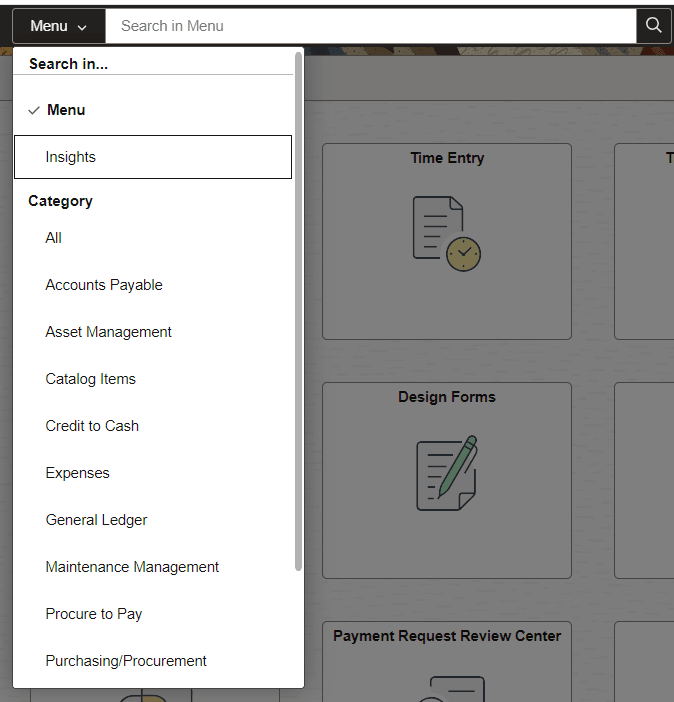
The use of Global Search categories is controlled by role-level security.
This table lists the Global Search categories, defined by PeopleSoft, that contain specific search indexes:
Note:
The global search categories in this table must be manually deployed from the Deploy Search Category tab in Search Framework before they are viewable from the Global Search field. If you deploy search categories, you must log out of the PeopleSoft system and log back in before the categories are visible in the global search drop-down.
| Global Search Category Description and Name | Transaction / Search Definition |
|---|---|
|
Menu |
Select to search menu items available to you. Menu items are those that are available to you from the Navigator menu. It is not recommended that you search for folder labels, such as “search framework.” Instead search for content reference names or descriptions. For example, enter “Deploy Search Objects”, which is a CREF label, or "definition based on worklist", which is a CREF description. |
|
Insights |
Select to search for Insights dashboard and visualizations. You can enter all or part of a dashboard name or description. You can also enter keywords to search for a visualization name that is in a dashboard; the dashboard it is in is displayed. |
|
Accounts Payable EP_PAYABLES |
Payments Vouchers |
|
Asset Management EP_ASSETS |
Assets |
|
Catalog Items EP_CATALOG_ITEMS |
Catalog items with suppliers Catalog items without suppliers Catalog express items |
|
Credit To Cash EP_CREDIT_TO_CASH |
AR Items AR Payments Billing Contracts Customers Grants Journals Projects |
|
Expenses EP_EXPENSES |
Expense reports |
|
General Ledger EP_GENERAL_LEDGER |
Journals |
|
Maintenance Management EP_WM_MAINTENANCE |
Maintenance Assets Maintenance Work Orders |
|
Procure To Pay EP_PROCURE_TO_PAY |
Assets Journals Vouchers Purchase Orders Requisitions Receipts Payments Procurement Contracts Purchase Order Contract Documents Purchase Order Documents Sourcing Events Expenses |
|
Purchasing / Procurement EP_PROCUREMENT |
Procurement Contracts Purchase Orders Receipts Purchase Requisitions Purchase Order Contract Documents Purchase Order Documents |
|
Strategic Sourcing EP_SOURCING |
Event Sourcing Documents Sourcing events |
|
Supplier Contract Documents EP_CS_AUTHORED_DOC |
Ad hoc Documents Event Sourcing Documents Purchase Order Contract Documents Purchase Order Documents |
|
Supplier Information EP_VENDORS |
Suppliers Supplier Conversations |
The Procure-to-Pay and Credit-to-Cash Global Search categories are used to search for transactions within the Procure-to-Pay and Credit-to-Cash business processes respectively. It does not include searches for setup components such as Suppliers and Catalog Items. Use the menu or All search category, or another search category that applies to the specific data, such as Supplier Information or Catalog Items to search for setup components.
Product based Global Search categories contain definitions within the specific product and limit search results to the specific product area.
This table lists permission lists and roles that have been created to secure search categories in the PeopleSoft database. These permission lists are setup with the corresponding Search Group (category) specified within the Search Group tab of the permission list. Users that have the corresponding role can see the associated category as a drop down option within the Global search field:
| Global Search Category Name | Role | Permission List |
|---|---|---|
|
Accounts Payable |
Search Accounts Payable |
EPSR1040 |
|
Asset Management |
Search Assets |
EPSR1030 |
|
Catalog Items |
Search Catalog |
EPSR1080 |
|
Credit to Cash |
Search Credit to Cash |
EPSR1100 |
|
Expenses |
Search Expenses |
EPSR1050 |
|
General Ledger |
Search General Ledger |
EPSR1060 |
|
Maintenance Management |
Search Maintenance Management |
EPSR1110 |
|
Procure to Pay |
Search Procure to Pay |
EPSR1000 |
|
Purchasing/Procurement |
Search Procurement |
EPSR1020 |
|
Strategic Sourcing |
Search Sourcing |
EPSR1010 |
|
Supplier Contract Documents |
Search Authored Documents |
EPSR1090 |
|
Supplier Information |
Search Supplier Information |
EPSR1080 |
Note:
If your organization has not purchased licenses for all products within the Procure to Pay or Credit to Cash search categories, you still need to deploy the Search Definitions for the product. However, you do not need to build the indices.
As an alternative, you can remove search definitions that are related to the products that you have not licensed. This is considered a minor customization.