Overview of the Data Export Import Utility Mapping Process
The Data Export Import Utility mapping process enables you to:
-
Export PeopleSoft database data to these formats:
-
Delimited files, such as CSV.
-
Fixed format files.
-
Other database records.
-
XML files.
-
-
Import data from these formats into a PeopleSoft database:
-
Delimited files, such as CSV.
-
Fixed format files.
-
XML files.
-
These steps comprise the Data Export Import Utility mapping process:
-
Define or identify a PeopleSoft document.
-
Define a document relationship.
-
Create a mapping definition for the source and target fields.
-
Define data transformation rules between source and target structures.
-
Run the Application Engine mapping process.
The mapping process is based on a PeopleSoft document and a document relationship definition that sets up the relationship rules between records and fields in the PeopleSoft document. Before running the mapping process, you create a map definition between the source and target data structures. The mapping process then applies the relationship and transformation rules when transferring the data from source to target.
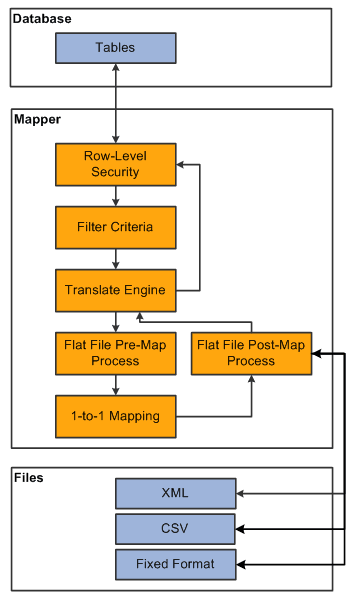
For more information about defining a PeopleSoft document and setting up a document relationship, see Mapping File Layouts and Document Relationships .
For more information about defining the map, see Defining the Data Source and Target.
For more information about executing the mapping process, see Requesting the Data Export Import Process.