Processing Receivables Transactions and Direct Journals with Entry Events
You can set up entry events to create transactions for items, payments, credit cards, drafts, direct debits and direct journals. You must set up the entry event codes with the predefined ARUPDATE and ARDIRJRNL processes and steps.
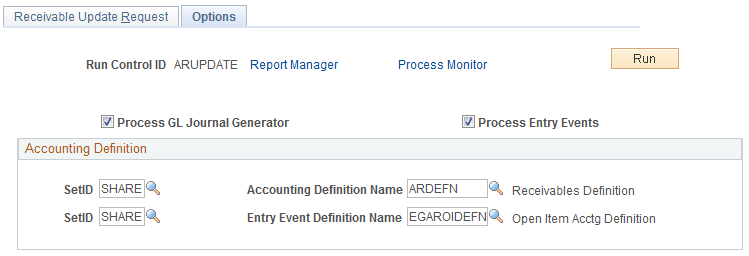
For all Receivables transactions except Direct Journals, the Entry Event process can be run as part of the AR posting job, Receivables Update (ARUPDATE). Navigate to . On the Receivables Update - Options page of the run control request, select the Process Entry Events check box to automatically run the Entry Event process after ARUPDATE runs. You can also use the Options page to automatically run Journal Generator to create GL journals. You must enter the accounting definition name for the standard entries (ARDEFN), and if you want to create GL journals for the supplemental (entry event) entries, enter EGAROIDEFN in the Entry Event Definition Name field.
This example illustrates the fields and controls on the Options page for running the Entry Event process as part of Receivables Update.
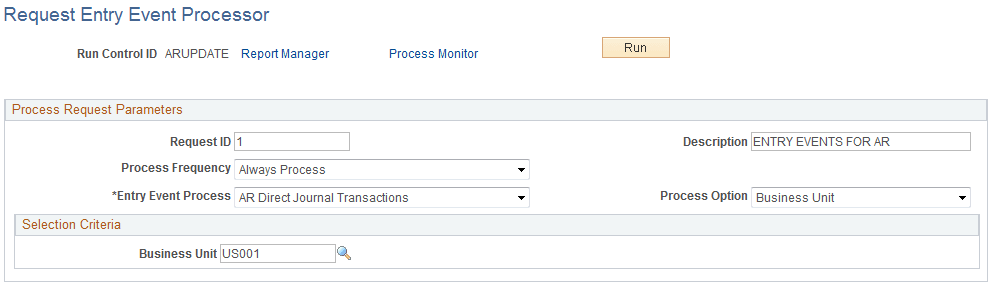
For all Receivables transactions, including Direct Journals, the Entry Event process can be run as a stand-alone process on the Request Entry Event Processor page (PST_EE_RUN_REQUEST). Navigate to .
This example illustrates the fields and controls on the Request Entry Event Processor page for running Receivables transactions, including Direct Journals.
For Direct Journal transactions, the Entry Event processor is expecting the journal to be posted successfully to the General Ledger before creating Entry Event entries. The process flow for Direct Journals would be as follows:
-
Enter a Direct Journal and mark it complete.
-
(Optional) Run the budget processor if necessary.
-
Run Journal Generator to generate GL journals using the accounting definition ARDIRJRNL.
-
Run the Entry Event processor.
-
Run Journal Generator to generate GL journals for the Entry Event entries, using the accounting definition EGARDJDEFN.
You can use the Modify Accounting Entries page to view both the standard and supplemental (entry event) accounting entries for Direct Journals.
See PeopleSoft Receivables: Journaling Payments Directly to the General Ledger.
Use the Journal Entry Drill Down page to view the GL journals for both the standard and supplemental (entry event) accounting entries.
See PeopleSoft Receivables: Reviewing the Source Accounting Entries for Journal Lines .