Setting Up and Closing Commitment Control Budgets with Entry Events
When you close Commitment Control budgets, the budget closing process creates budget journals that are posted to the budget ledger. Typically you either choose to close out the remaining balance of the budget for the period or roll forward the remaining balance into the next fiscal year and period. In both situations the budget closing process creates budget journals. If you enabled entry event in the Installation Options, you have the option of selecting an entry event code when you close the budgets. The budget journals are created in adjustment periods and the Entry Event processor also creates the closing entries in the budget journal adjustment periods. When you run journal generator for these accounting entries, it retains the adjustment periods so that they are posted in the specified ledger with budget journal adjustment period dates.
This topic discusses how to:
-
Set up entry events for Commitment Control budget close.
-
Process entry events in Commitment Control budget close.
Setting Up Entry Events for Commitment Control Budget Close
To set up entry events for Commitment Control budget close:
-
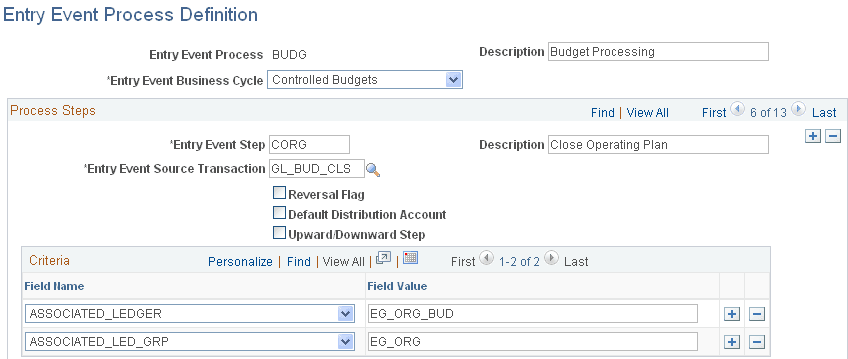
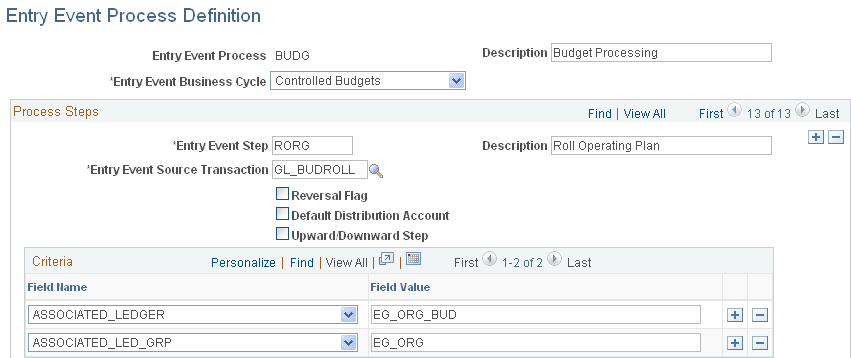
Set up the entry event process BUDG with two entry event steps based on the entry event source transactions:
-
GL_BUD_CLS for step CORG
-
GL_BUDROLL for step RORG
-
-
Associate the appropriate ledger group and ledger.
-
Create an entry event code such as CLOSEYEAR for the process BUDG and add these steps:
-
CORG
-
RORG
-
-
Add the accounts to which you want to post the budget close accounting entries for each entry event step.
Note:
Refer to the sample Entry Event Process Definition pages (Set Up Financials/Supply Chain, Common Definitions, Entry Event, Process, Entry Event Process Definition)
This example illustrates the fields and controls on the Entry Event Process Definition page - budget close step. You can find definitions for the fields and controls later on this page.
This example illustrates the fields and controls on the Entry Event Process Definition page - roll forward step. You can find definitions for the fields and controls later on this page.
Processing Entry Events in Commitment Control Budget Close
Example:
-
Budget for FY 2011: 1000.00 USD.
-
Expended: 400.00 USD.
-
Remainder: 600.00 USD.
-
Entry Event Code: CLOSEYEAR.
-
Entry Event Step: CORG and account 4610 (DR) and 4510 (CR).
-
Entry Event Step: RORG for account 4510 (DR) and 4610 (CR).
-
Based on this example, after you run the Commitment Control Budget Close process, select the Entry Event Processor to generate these accounting lines with which Journal Generator creates journals that are posted to the ledger and ledger group specified on the Entry Event Process Definition page.
| Account | Fiscal Year | Accounting Period | Amount |
|---|---|---|---|
|
4610 |
2011 |
998 |
600.00 USD |
|
4510 |
2011 |
998 |
<600.00> USD |
|
4510 |
2012 |
0 |
600.00 USD |
|
4610 |
2012 |
0 |
<600.00> USD |