Using Data Partitioning for High Volume Indexes
Indexing search definitions that have a large volume of data can take a long time to finish. To overcome this issue, PeopleSoft Search Framework enables you to partition the search definition data using the Index By Data Partition option on the Build Search Index page.
Note:
PeopleTools 8.61 is required to use data partitioning.
For additional information about data partitioning, see PeopleTools Search Technology, Administering PeopleSoft Search Framework, Working with Search Indexes.
Use the Schedule Search Index page (PeopleTools, Search Framework, Administration, Schedule Search Index) to submit a search definition for indexing.
This example illustrates the fields and controls on the Build Search Index page when a search definition is selected that is enabled for data partitioning.
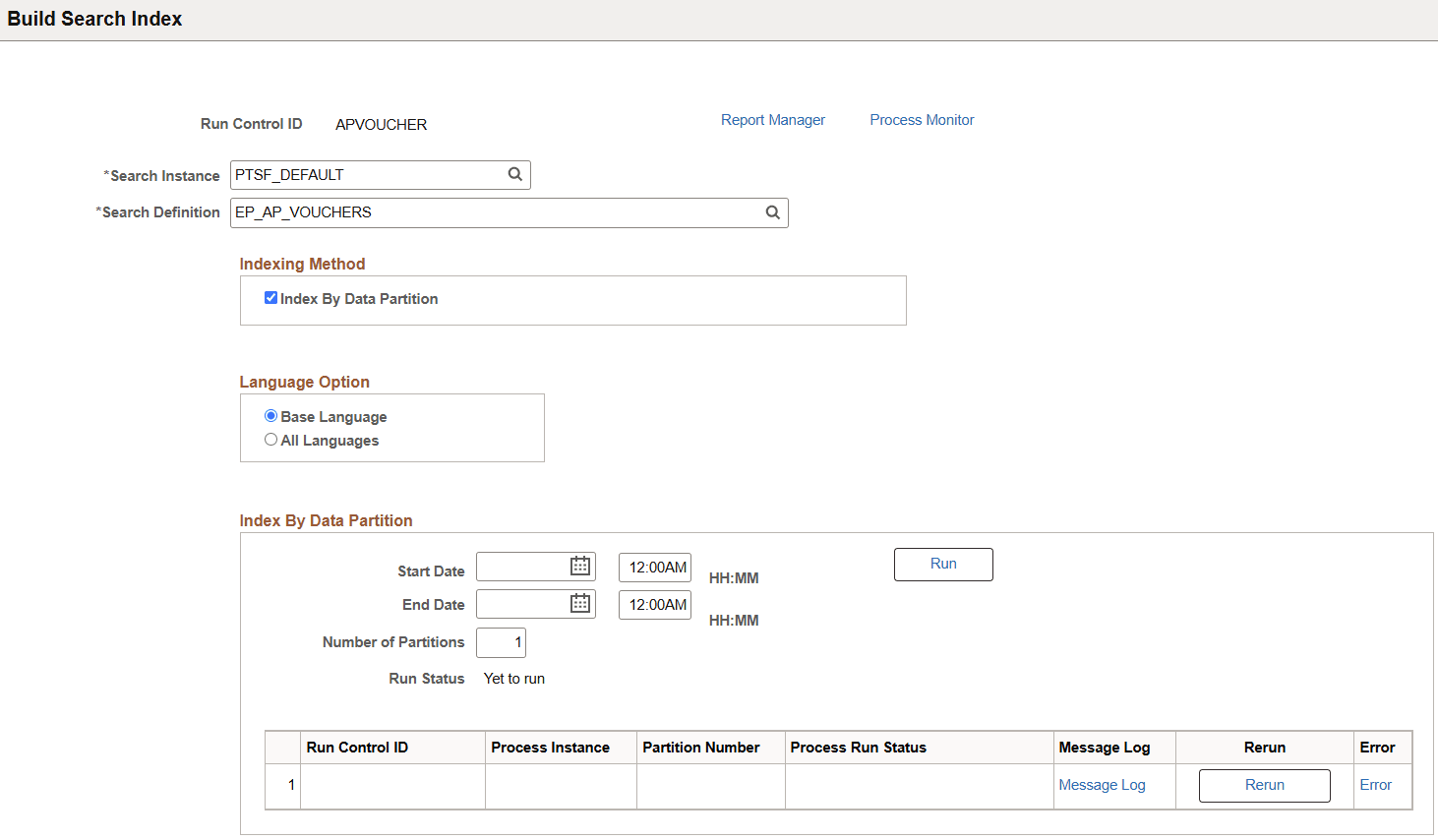
From the Build Search Index run control page:
-
Assign a Run Control ID that reflects the index you are building.
If more than one user is building a particular index, each person must create their own run control.
-
Select a search definition that is enabled for data partitioning.
These application-specific search definitions are enabled for data partitioning:
Application Search Definitions Billing
EP_BI_BILLING
EP_BI_HDR_KIB
Contracts (or Grants)
EP_CA_GM_PROJRES_INSIGHT
General Ledger
EP_GL_JOURNAL
EP_GL_JOURNAL_KIB
EP_GL_LEDGER_KIB
Payables
EP_AP_PAYMENTS
EP_AP_PAYMENTS_KIB
EP_AP_VOUCHERS
See also PeopleSoft Payables: Understanding Search Framework in PeopleSoft Payables
Project Costing
EP_PC_PROJ_RES_KIB
Purchasing
EP_PO_PURCHASE_ORDERS
EP_PO_RECEIPTS
See also PeopleSoft Purchasing: Understanding Search in PeopleSoft Purchasing
eProcurement
EP_PO_REQUISITIONS
See also PeopleSoft eProcurement: Understanding Search Framework Search Engine
Receivables
EP_AR_ITEMS
EP_AR_ITEM_ACT_COLL_KIB
EP_AR_PAYMENTS
EP_AR_PMT_ENTRY
See also PeopleSoft Receivables: Understanding Search Framework in PeopleSoft Receivables
-
Select Index By Data Partition, which is only available for high-volume search definitions.
Note:
Oracle PeopleSoft does not recommend that you select the Index by Date Range Indexing Method.
-
In the Index By Data Partition section, enter a Start Date and End Date to select data from that range.
Note:
You do not have to select all of your data using these dates. When using multiple run controls, you can select data in chunks, index that set using partitions, and then select a different date range. PeopleSoft recommends that you index your most recent data first so that you can get your search definition working. Then index earlier data. Indexing by data partition is additive, meaning, it always adds more data to your index incrementally.
-
Enter a number in the Number of Partitions field, to specify how the system should split the data based on the entered date range.
The system chunks the data into equal partitions.
For more information on Index By Data Partition option, see PeopleTools Search Technology, Administering PeopleSoft Search Framework, Working with Search Indexes, Partitioning Application Data in the Search Index Build Process Using Data Partition.