Finalize Accounting Entries Page
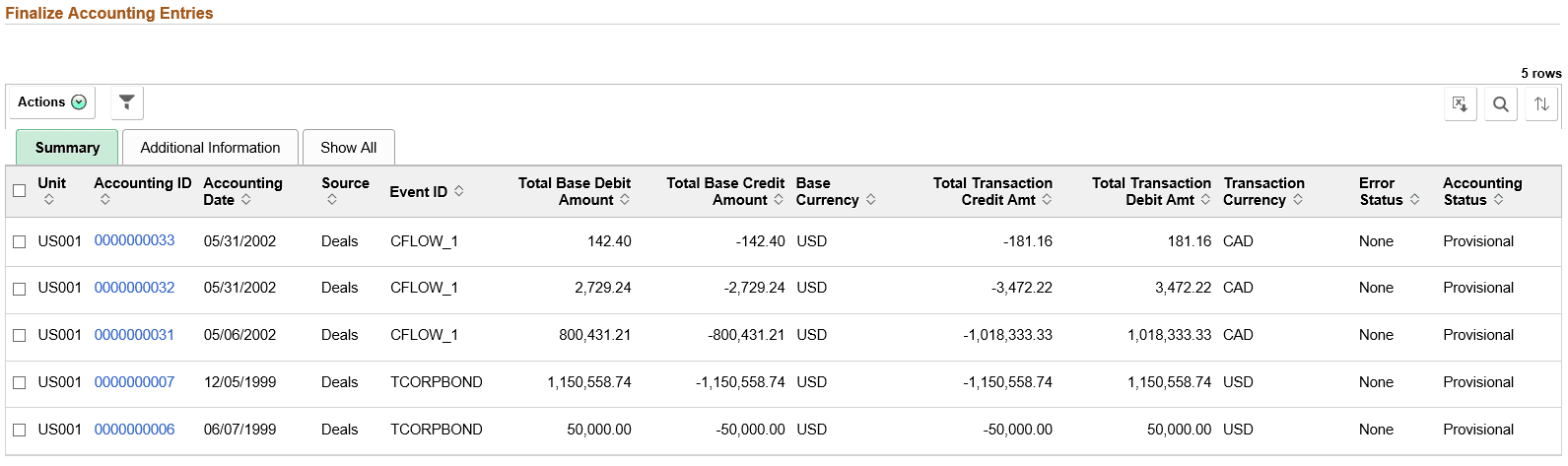
Use the Finalize Accounting Entries page (TR_APP_WC_GRID_FL) to display and finalize accounting entries with a Provisional status.
Navigation:
Click the Cash: Finalize Accounting Entries link.
This example illustrates the fields and controls on the Finalize Accounting Entries page - Summary tab. You can find definitions for the fields and controls later on this page.
| Field or Control | Description |
|---|---|
|
|
The available actions are the following:
|
|
|
Click to refine filter criteria. |
|
|
Click to download data from the current grid into an Excel file. |
|
|
Click to search for a desired value in the current grid. |
|
|
Click to sort current grid data by one of the grid columns. |
|
Accounting ID |
Click the Accounting ID value to open the View/Approve Entries page |
|
|
Click to view Accounting Details page that contains additional data regarding the accounting entries. This icon is available only for the small form factor. |


