Setting Pagelet Options in the Treasury WorkCenter
Use the Pagelet Personalization pages to minimize a pagelet or to customize viewing options for links in each pagelet.
For example, you can set any link in a pagelet to appear on your Treasury WorkCenter start page.
Navigation:
Click the Pagelet Settings icon in the pagelet header, and select Personalize.
This example illustrates the fields and controls on the Links Pagelet Personalization page for Treasury WorkCenter.
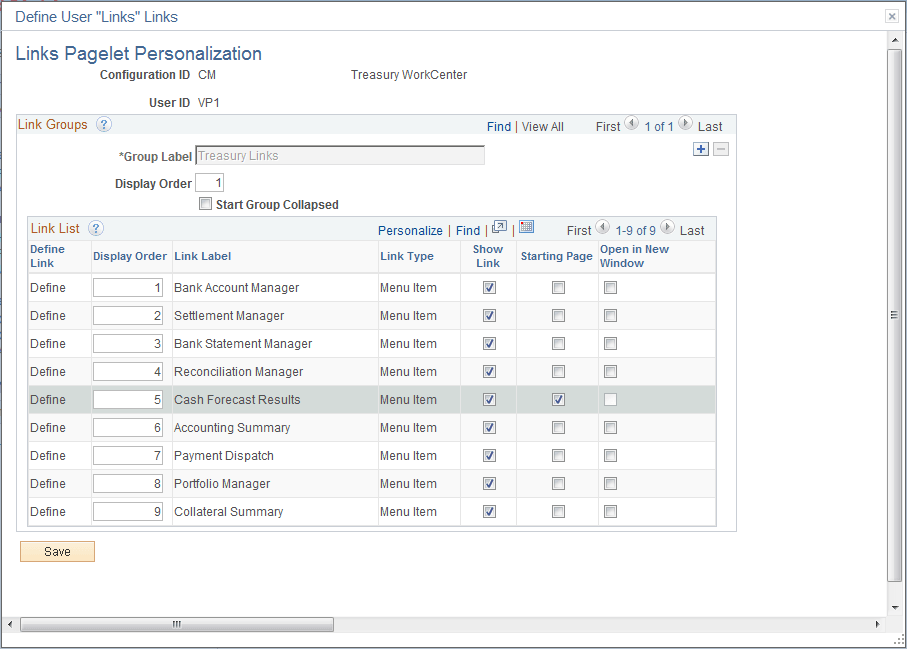
In the example shown for the Links pagelet, the Cash Forecast Results page has been selected. Upon opening the Treasury WorkCenter, the Cash Forecast Results page will appear in the transaction pane of the workcenter for this user.
| Field or Control | Description |
|---|---|
|
Starting Page |
Select this check box to set the link destination to appear on your workcenter upon startup. |
|
Open in New Window |
Select this check box to launch the link destination in a new window when you click the pagelet link. |