Settlement Manager Page
Use the Settlement Manager page (STL_MGR) to review and manage all settlement activity from a central location.
Navigation:
This example illustrates the fields and controls on the Settlement Manager page. You can find definitions for the fields and controls later on this page.
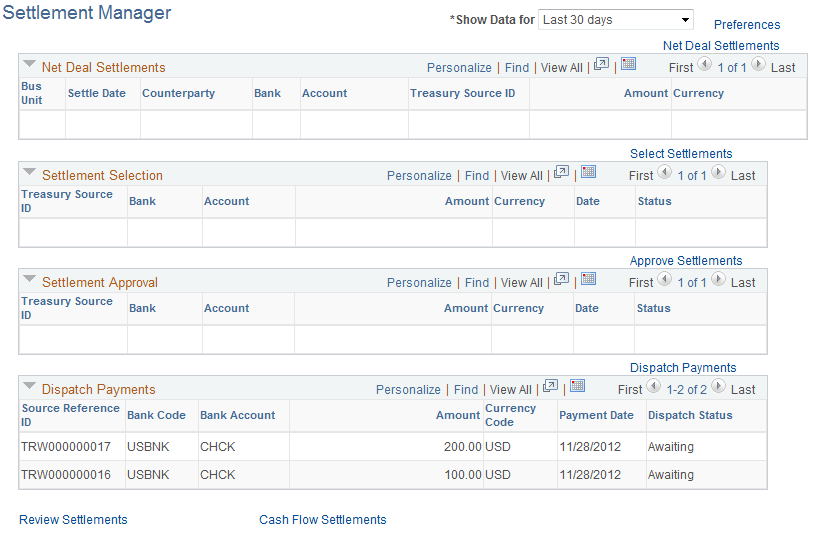
This manager displays settlement categories with summarized information. To view the content of a settlement category, click the link that is located on the right in each category.
| Field or Control | Description |
|---|---|
|
Show Data for |
Select to view data of:
|
|
Preferences |
Click to establish the default search criteria for Settlement Manager on the Settlements User Preferences page (STL_SELECTION_PREF). |
|
Net Deal Settlements |
Click to access the Net Deal Settlements page, and view deal transactions that are coming up for netting. |
|
Select Settlements |
Click to access the Select Settlements page, and view which settlements are available for selection. |
|
Approve Settlements |
Click to access the Approve Settlements page, and view which settlements are coming up for approval. |
|
Review Settlements |
Click to access the Review Settlements page and review settlement information. |
|
Cash Flow Settlements |
Click to access the Cash Flow Settlements page (RUN_TRC1014) and generate the Cash Flow Settlement report. |