Understanding the Bilateral Netting Process
Bilateral netting is a process by which two parties (supplier and client to each other) reduce or aggregate the overall number of transactions between them. This decreases actual transaction volume between the two parties. It also decreases the amount of accounting activity and associated business costs (for example, banking fees).
This topic discusses how to configure, define, and process netting transactions. You can:
-
Select the suppliers and customers involved in a netting relationship.
-
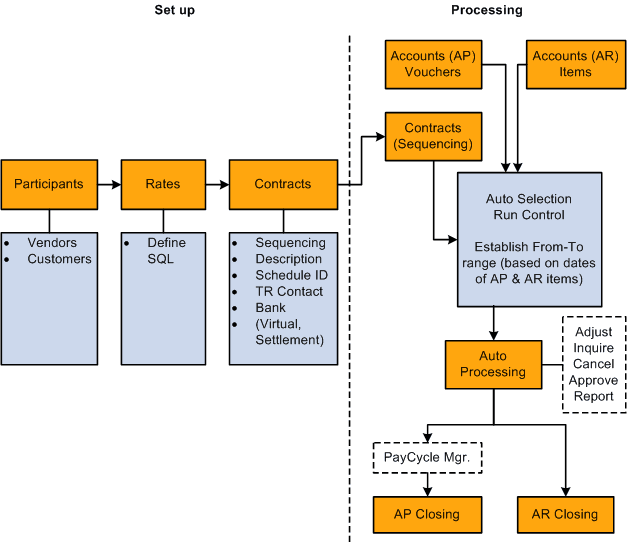
Define the rules, contracts, sequence order, and settlement method of a net.
-
Generate inquiries and reports on your netting data.
There are two netting closing methods: partial and full.
-
In partial netting, all items are netted to zero (0), and no payment or receipt of funds is done. You must run Pay Cycle Manager to make any adjustments or changes to the vouchers. Any voucher or item balance that is remaining is handled separately in Payables or Receivables.
Only the matching balance is paid off during partial netting, leaving some receivables items or payables items open. For example, if the total amount of all payables items participating in a netting cycle is more than the total amount of all receivables items, all receivables items are paid (or closed). The total amount applied to the receivables items is then used to pay individual payables items until this amount reaches zero. Likewise, if the total amount of all receivables items participating in a netting cycle is higher than the total amount of all payables items, all the payables items are paid. The total amount applied to the payables items is then used to pay individual receivables items until this amount reaches zero.
-
With full netting, you pay or receive all voucher items that are due.
During full netting processing, all receivables and payables items participating in the netting cycle are paid, and a new item is created for the remaining balance. This means that if the total amount of all payables items participating in any one netting cycle is more than the total amount of all participating receivables items, the system automatically creates a new receivables item (an invoice). If the total amount of all receivables items is more than the total amount of all payables items, the system creates a new payables item (a voucher).
Note:
PeopleSoft delivers and supports only partial bilateral netting functionality. However, you can adapt the application to handle full bilateral netting functionality (though PeopleSoft will not support this configuration). In addition, when using full bilateral netting functionality, you can also optionally activate the value-added tax (VAT) functionality to calculate VAT transactions.
Here is an example of partial bilateral netting:
Company A is both a client and a supplier of Company B and holds Accounts Payable (AP) and Accounts Receivable (AR) line items in relation to Company B. The two companies set up a contractual netting relationship, modifying their typical accounting, to enter into this protocol. They agree on particular intervals to conduct netting and zero out their respective accounts.
Company A's books contain the following line-item amounts:
| AP | AR |
|---|---|
|
100 |
150 |
|
250 |
50 |
|
Total: 350 |
Total: 200 |
|
<200> |
|
|
Net: 150 |
Without netting, Company A would have conducted four transactions to address the two Accounts Payable and two Accounts Receivable line items. Instead, their single outstanding balance to pay off and zero out after processing is 150. Using this example, Company B's books would be a mirror image of Company A's.
This is a simple example, but if there are hundreds or thousands of transactions happening between organizations, there can be a considerable decrease in transactional activity and attendant fees. This graphic illustrates the bilateral netting process.
Overview of the bilateral netting process