Commitment Control WorkCenter - My Work
Use Commitment Control WorkCenter - My Work to view and take action on frequently-used components and be alerted to the transactions that require your attention.
Navigation:
Select the Commitment Control WorkCenter tile and expand My Work.
This example illustrates the fields and controls on the Commitment Control WorkCenter - My Work (Fluid).
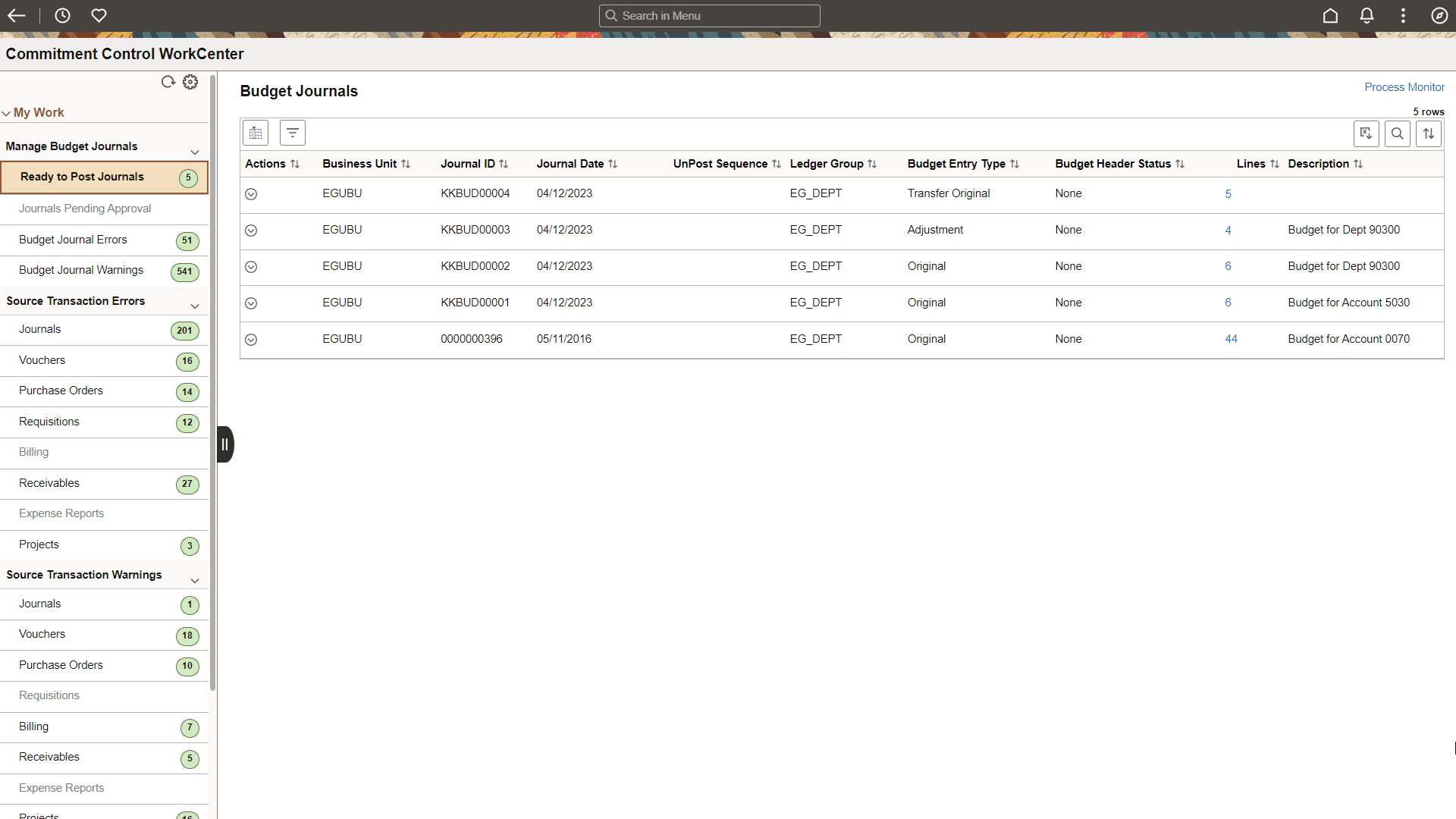
The My Work pagelet is pre-defined and includes links to pages that you need to access most often. It can also include items that require your attention and potentially some type of action. Some links that are set up for the My Work pagelet can be subject to filter criteria that limit the amount of data that is available to a user. If enabled by the system administrator, you can personalize your My Work section by clicking the Personalize icon.
Delivered links are grouped into these sections. However, your system administrator can customize this per your needs:
-
Manage Budget Journals
-
Source Transaction Errors
-
Source Transaction Warnings
Manage Budget Journals
Use this section to perform actions:
| Link/Option and Description | Row Actions | Bulk Actions |
|---|---|---|
|
Ready to Post Journals: Manage journals that are ready to post. These journals do not need approval or have an Approved status |
Budget Pre-Check Open Budget Journal Post Journal |
Budget Pre-Check Email Notification Post Journal |
|
Journals Pending Approval: View journals that need approval. These journals cannot be posted until they are approved. However, Budget Pre-Check can be performed, which checks for exceptions without posting the journal. |
Budget Pre-Check Open Budget Journal |
Budget Pre-Check Email Notification |
|
Budget Journal Errors: Edit control budget journals that have budget errors. This exception must be corrected before you can process the transaction against the budget. |
Budget Check Budget Override Go to Source Entry Go to Transaction Exceptions |
Budget Check |
|
Budget Journal Warnings: View control budget journals that have budget warnings. These warnings are informational and do not require action. |
Go to Source Entry Go to Transaction Exceptions |
None |
Source Transaction Errors
Use this section to perform actions on budget exceptions based on the source transaction type. You can drill into the source entry, Transactions Exceptions page, resolve errors, and budget check multiple rows.
| Field or Control | Descriptions |
|---|---|
|
Exceptions |
Select to view exception details. |
|
Overridden |
Select to view budget override details such as User ID and date time stamp. This link is enabled only when the budget is overridden. |
|
ChartFields |
Select to view budget ChartFields. |
| Row Actions | Bulk Actions |
|---|---|
|
Budget Check Budget Override Go to Source Entry Go to Transaction Exceptions |
Budget Check |
Source Transaction Warnings
Use this section to perform actions on budget exceptions that have source transaction warnings. You can drill into the source transaction.
| Row Actions | Bulk Actions |
|---|---|
|
Go to Source Entry Go to Transaction Exceptions |
None |