Generate Parent Budgets, Budget Adjustments, and Budget Transfers Automatically
Commitment Control provides the flexibility to design complex multilayered budgeting structures to support your budgeting requirements. However, after you have set up your budgets and established the budget hierarchy, the manual creation, adjustment, and transfer of budgeted amounts can be a tedious and time-consuming task when multiple budget layers are involved.
Commitment Control provides for automatic generation of parent budget level activity to streamline the entry, adjustment, and transfer functions for multilevel budgeting with complex budget hierarchies. Using the parent budget automatic generation feature, the budgeting impact associated with child level budget journal entry can be automatically reflected at all levels above the specified originating child budget entry level. This functionality saves a significant amount of time because budget maintenance can be done at the lowest child level and the system automatically handles the budget impacts associated with each of the higher parent budget levels. This enables what might be referred to as bottom-up budgeting.
Automatic generation of parent budget impacts revolves around the originating journal. The originating journal is a child level budget, budget adjustment, or transfer budget journal, entered manually or by other means, such as journal import or allocations, on which the parent or multiple parent budget level impacts are generated.
The term impacts refers to the automatically generated parent entries created and other system-provided information depending on prior setup and budget definitions, such as entry event generation.
Note:
The automatic generation of parent budgets from child budget journals does not create parent budget journal records. It creates the parent level impacts and post that generated activity to the KK_ACTIVITY_LOG record.
This diagram shows how a budget transfer initiated at the lowest level within a budget hierarchy is reflected at each level in the ledger groups hierarchy:
Parent budget impacts generated by child budget journal transfer
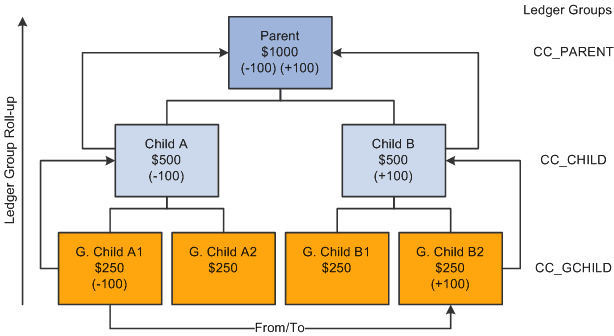
In this example, 100 USD is transferred from the budget G Child A1 to budget G Child B2 within the same CC_GCHILD ledger group. Assuming that you previously set up the option to automatically generate the parent budget impacts, when the originating child journal is posted, the impact to the CC_CHILD and CC_PARENT ledger groups is automatically generated and posted to the budget ledgers for each successive ledger group in the hierarchy.
The functionality does not support the automatic generation of journals to transfer budget amounts directly between ledger groups. For example, it does not support directly transferring 100 USD from G Child A1 to Child A or Child B. The same is true for a transfer from Child A to G Child A2 or B2. Neither does it support transfers from G Child A1 to Child A or from G Child B1 to Child B.
Although originating entries are usually made at the lowest child level, your originating budget, budget adjustment, or budget transfer journal can be entered at any intermediate level within a budget hierarchy and during posting the system creates the budget impacts for all of the ledger groups that are at and above the originating budget journal level. No impact is automatically generated below the originating level.
Note:
When you increase budget amount enter increases as positive amounts and enter decreases as negative amounts. This is true for both expenditure and revenue budgets.
Automatic generation is not available below an originating level and manual journal entries must be made to affect single levels within a budget hierarchy.
Originating budget journal entries made at intermediate budget group levels result in the total of the intermediate budget and its parent budgets exceeding the child budgets below that intermediate originating budget level. For example, if you are using automatic generation and you increase Child A by entering an originating budget adjustment for 500 USD, its Parent budget is increased to 1500 USD and the total of Child A and Child B equals the 1500 USD total for the Parent budget. However, the total of G Child A1 and A2, 500 USD does not equal their parent budget Child A total of 1000 USD.
You might want a condition where Child A exceeds the total budget for G Child A1 and A2 if you plan to budget certain expenditures at the higher budget level of Child A and do not want the budget detail or roll up of expenditures that could be afforded by G Child A1 and A2 for certain categories of expenditures. For example, you might want to budget for total office expense at the Child A level rather than at G Child A1 or A2 levels or have detail amounts for such things as office supplies, machine rental and maintenance for G Child A1 and A2 that rolls up to office expense.
The processing of the budget impacts to all of the ledger groups (including the impact to that of the originating journal entry for the originating child budget) is treated as a single unit of work, so that if an exception is encountered at any level during the posting process, none of the budget ledgers are updated. All levels must pass the posting edits for anything to be committed to the budget ledgers. The same is true when unposting automatically generated journals.
When you do an unpost, the budget processor does not directly remove the posted originating budget journal and the generated impact to other ledger groups. Instead, the budget processor creates a new journal that is a copy of the posted originating version, but with reversed signs for the amounts. After the new journal is created, the budget processor budget checks the newly system-generated journal and thereby reverses the impacts of the original journal.
This method of creating and processing the unpost journal is used in order to leave a complete audit trail. The unposting journal will be created with the same journal date as the original. Hence the same set of effective-dated budget definition rules will be used.
All automatically generated impacts are distinguished by the system from journal entries that you manually enter or from journals entered by other methods, such as journal import or allocations, and can be viewed by clicking the Posted link for the Budget Header Status on the Budget Lines page when the originating journals and their impacts for parent budgets have posted successfully. The link accesses the Commitment Control Activity Log criteria page where you provide inquiry criteria to view the activity created by the process.
Ledger groups that are system generated are visible from the Activity Log and Activity Log Drill-down inquiries.
The source transaction definition as delivered for budget journals specifies JOURNAL_DATE, and budget posting uses the originating journal date to perform effective date lookups on all setup related tables when creating journal impacts for parent budgets. Parent budgets mirror originating child budget dates.
Cumulative budgeting can be implemented in one of two ways:
-
Use a cumulative calendar, in which case the cumulative date range is programmatically determined by budget posting when the originating journal is posted.
-
Specify a cumulative date range at the budget attribute level.
This second method is typically used when using multiple year overlapping budgets.
The system cannot determine what the cumulative date range should be at the parent budget levels, when a cumulative date range has been specified on the originating budget journal. So, the cumulative dates on the originating journal will not be inherited by the generated parent budgets. Instead, you must manually specify these dates at the various parent budget levels within the Budget Attribute component after the parent budgets have been generated and posted.
After all entries are successfully posted, you can view the budget impacts for all affected budgets from within a single inquiry by clicking the Posted link for the Budget Header Status on the Budget Lines page.
If there are errors after running the budget posting process, click the Errors link for the Budget Header Status to access the Budget Journals Exceptions page to determine the nature of the errors and access the necessary corrections before running the process again. An error encountered at any level in the budget hierarchy errors out and prevents posting of both the originating child budgets as well as the parent impacts.
Note:
If you do not activate security for the Budget Entry or Adjustment event and for the Budget Transfer event, anyone who has general security access to these pages is able to enter, adjust, and transfer budget amounts.
See Generating Parent Budgets, Budget Adjustments and Budget Transfers Automatically.