Key ChartFields and Translation Trees
Key ChartFields and translation trees determine how the Budget Processor identifies the correct budgets for a transaction that is submitted for budget checking.
Key ChartFields
When you set up control budget definitions, you specify budget keys, which are the ChartFields that you require for budget journals and source transactions to identify budgets for budget checking. .
Budget journals and source transactions that do not have values for budget key ChartFields will fail posting and budget checking unless you select one of two other Value Required options. You can instruct the budget processor to bypass transaction lines if key ChartFields other than Account are set to Not Required. Setting the Value Required option to Optional allows you to maintain budget rows with blank values for the same budget key structure that was not possible in prior releases.
The Control ChartField and the Ruleset ChartField are always required as keys for all Rulesets. Each ruleset in a budget definition can have its own set of additional budget keys.
Translation Trees
Most enterprise budgets are at a level above the level of their detail source transaction ChartField values. For example, while you might record source transactions to separate accounts for outside copy service and use another account for copier paper stock and supplies, for your budgets you would probably group transactions for both these accounts and track them at a summary level in an account called Office Supplies. To be included in budgetary control and tracking, the copy services and inhouse copy supplies accounts that you enter on transactions require translation to the budgetary Office Supplies account.
By translating source transactions to Commitment Control budgets, translation trees provide a convenient way to budget at a high level while using detail-level ChartFields in transactions. Using trees, you set up a hierarchy of ChartField values, such as accounts, with all of the budgetary-level values at the same level or even at more than one budgetary level, for example, if you have parent and child budgets that budget at different levels. When you set up budget definitions, you enter the tree name and appropriate budgetary level for each key ChartField. The Commitment Control Posting process can then determine which ChartField values are valid for budget journals, and how to roll source transaction ChartField values up to those budgetary ChartField values for budget checking against the appropriate budget.
You must have a tree for each ChartField that you use as a budget key and that you want to translate.
The budget processor references the version of the tree that has the greatest effective date that is before or equal to the budget definition's effective date that is used to process a particular transaction. The budget definition's effective date is based on the budget date that is specified on each source transaction line.
Note:
The budget processor looks to the latest translation tree, that is, the tree with the latest effective date, whether it is active or inactive, when processing transactions with dates after the latest effective-dated tree. For example, assume that you have a tree for which the initial effective date is January 1, 1900 and its status is active. If you then create a tree for February 1, 2011 and set the status to inactive, the budget processor still looks to the latest tree with the effective date of February 1, 2011 for any transactions dated on or after February 1, 2011. Under these conditions the budget processor does not process using the active tree dated January 1, 1900 but issues a message that an invalid tree exists because it looks to the February 1, 2011 tree, and it is inactive.
Accounts Tree Example
The following example illustrates how tree levels translate data.
Sample Translation Tree
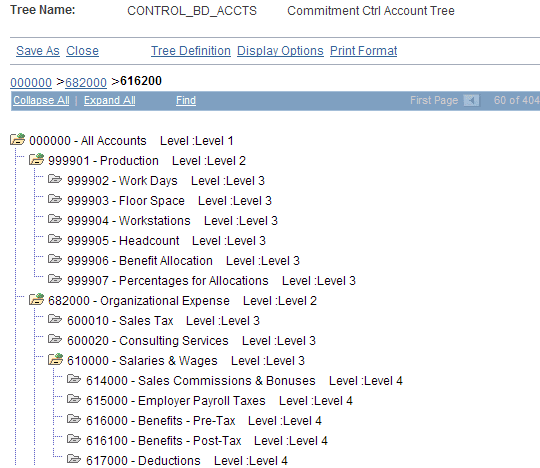
The sample translation tree contains the following levels, beginning with the level 1 node:
-
Level 1: Node 000000
-
Level 2: 999901 and 682000
-
Level 3: 999902−999907, 600010−600020, 610000, and 616200−621000
-
Level 4: 614000−617000
When you define a control budget definition, you enter the tree level at which you want to define budgets for each key ChartField. Suppose that you want to budget at account ChartField level 3 for the sample translation tree. You enter tree level 3 for account on the Keys and Translations page. All account values found at level 3 and levels 2 and 1 above it are then valid for budget journals, and all source transaction account values below level 3 roll up for budget checking to the budgets that you define at that level. Budget Journal processing validates against the translation rules that you established in your budget definition in the tree to ensure that you selected the correct value for the budget account.
On the Control ChartField page, you can also choose whether to include all control ChartField values at your budgeting level or to exclude some. These are the results that depend on your choices:
-
If you select the All Values option, then all control ChartField values at or above the tree level that you entered on the Keys and Translations page are valid for budgeting and budget-checking.
Source transactions with any value for the control ChartField are budget checked.
-
If you deselect the All Values check box, you must enter each value that you want to be valid for budgeting on the ChartField Values grid.
Only source transactions with values that translate to the values in the list are budget checked.
For example, assume that you are budgeting at level 3. You deselect the All Values check box and enter the values 999901 and 610000 onto the ChartField Values grid. The following results occur:
-
If a purchase order has the level-4 account 614000, then the Budget Processor translates the account to 610000 by using the tree and level information that you entered on the Keys and Translations page.
The Budget Processor checks account 610000.
-
If a second purchase order has the level-3 account 616200, the Budget Processor translates the account to itself.
Because 616200 is not one of the level-3 accounts that you entered as valid for budget checking, the Budget Processor does not budget check this transaction.
Winter Trees and Spring Trees
Commitment Control can use either winter trees or spring trees to translate budget keys.
A winter tree uses the detail value table for nodes and has no leaves. That is, each node is a valid detail ChartField value. The previous section, Accounts Tree Example, shows a winter tree.
A spring tree is a hybrid between a node-only winter tree and a summer tree. A summer tree uses the PS_TREE_NODE table for nodes and a detail value table for leaves. A spring tree uses a detail value table for the nodes as well as the leaves:
Spring Tree
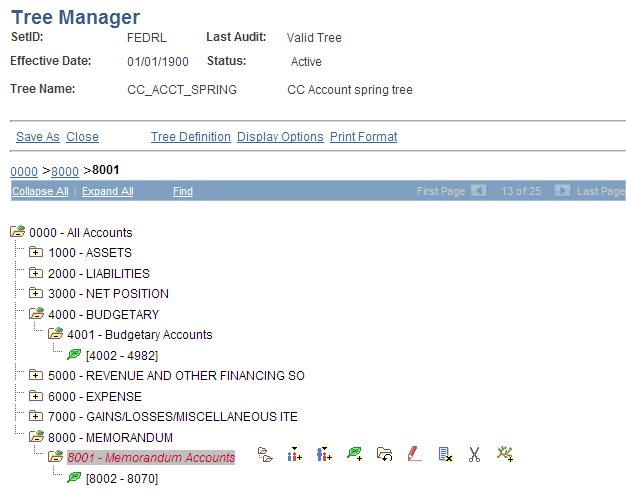
In this spring tree, the 4001 account is a budget-level node, whereas accounts 4002 - 4982 are detail-level leaves that roll up to the 4001 node. Note that you can define leaves in spring trees as ranges of detail values.
Spring trees reduce tree maintenance by allowing you to add ChartField values to the system without having to update trees, as long as new values are within a detail-value range already defined for the tree.
Whether you use spring or winter trees, each node must be a valid ChartField value. You must therefore assign the detail table name as the tree node table in the tree structure.