Asynchronous and Synchronous Messages
The integration between PeopleSoft CRM and PeopleSoft Transaction Billing Processor consists of three asynchronous request-response messages, as well as one synchronous message. The asynchronous messages include the Contract Request (CONTRACT_REQUEST), Contract Response (CONTRACT_RESPONSE), and Contract Transaction (CONTRACT_TXN) messages. Additionally, there is one synchronous message to verify that no pending activity (PENDING_ACTIVITY) exists in PeopleSoft CRM for a contract revenue plan or billing plan.
Note:
PeopleSoft Lease Administration does not use these messages.
Asynchronous Request-Response Messages
The following figure shows the asynchronous messages that pass between the PeopleSoft Transaction Billing Processor and PeopleSoft CRM:
This diagram shows the asynchronous messages that pass between the PeopleSoft Transaction Billing Processor and PeopleSoft CRM
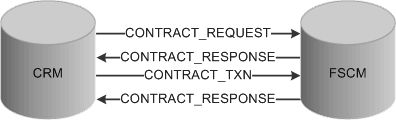
The asynchronous messages used in the integration process include:
| Term | Definition |
|---|---|
|
Contract Request |
Prompts the system to create a new contract. The contract request is initiated by PeopleSoft CRM. PeopleSoft CRM performs an internal scan to determine if a contract already exists. If no contract exists, then PeopleSoft CRM sends the contract request message. Note: In the case of a renewal, PeopleSoft CRM sends the contract request message with a different request type indicating that PeopleSoft Transaction Billing Processor should add a new contract line to the existing contract instead of creating a new contract and contract line. The addition of a new contract line to the existing contract takes place through amendment processing functionality. Note: The minimum required fields to request a contract are the Contracts business unit and Sold To Customer. |
|
Contract Response |
The Contract Response message is initiated by the PeopleSoft Transaction Billing Processor. For recurring and one-time transactions, this message is sent only once. For on-demand transactions, this message is sent twice. For on-demand transactions, the system sends the contract response message for a second time once the Contracts Billing Interface (CA_BI_INTFC) process is complete to provide the status of the transactions to PeopleSoft CRM. |
|
Transaction |
Populates the Transaction Billing Processor Interface tables. PeopleSoft CRM calls the contract transaction message after the contract is created, and it is ready to receive bills. In addition, when PeopleSoft CRM performs an internal scan to determine whether a contract already exists and it finds that a contract does exist, instead of sending a contract request message, PeopleSoft CRM sends the contract transaction message. |
Synchronous Messages
The following figure shows the synchronous message that passes between the PeopleSoft Transaction Billing Processor and PeopleSoft CRM:
This diagram shows the synchronous message that passes between the PeopleSoft Transaction Billing Processor and PeopleSoft CRM
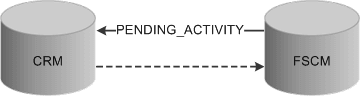
The synchronous message used in the integration process includes:
| Term | Definition |
|---|---|
|
Pending Activity |
The pending activity message (PENDING_ACTIVITY) identifies whether any pending activity exists for a contract revenue plan or billing plan. The message is triggered by the status of a billing or revenue plan changing to Complete. Only plans with a transaction source (CA_TXN_SOURCE) of CRM invoke this check. The system completes the following checks to determine whether the billing or revenue plan status can change to Completed:
|