Billing Plan - Billing Plan General Page
Use the Billing Plan - Billing Plan General page (CA_BP_GEN_INFO) to define the high-level billing information for a billing plan.
The system associates the information on this page with all the billing lines associated with this billing plan. This information is sent to PeopleSoft Billing.
Navigation:
-
-
Click the Bill Plan ID link on the Review Billing Services for CRM page. Select the Contract tab.
This example illustrates the fields and controls on the Billing Plan - Billing Plan General page. You can find definitions for the fields and controls later on this page.
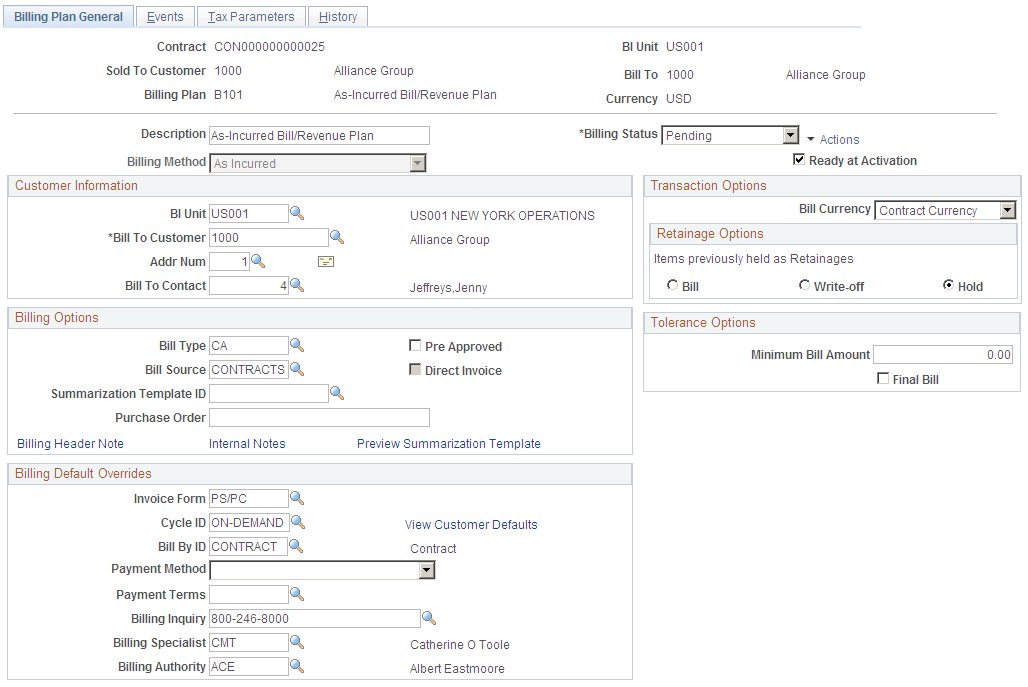
The system populates the fields on this page upon contract creation from an agreement from PeopleSoft CRM. The system populates the Billing Method field with the As Incurred billing method. You cannot change this value.
Note:
For PeopleSoft CRM-related contracts, the Tax Parameters and Events tabs are not available.
Note:
This page is not available for on-demand transactions.
See Understanding Billing in Contracts.
Billing Options
PeopleSoft Billing uses a hierarchical system of defaults to determine billing options. Billing options that you do not specifically define for a billing plan appear by default from a higher level. Billing options that you do select here impact other aspects of your bills. For example, the selections that you enter for the Bill Type and Bill Source fields impact the format of your final invoice.
| Field or Control | Description |
|---|---|
|
Bill Type |
Accept the default value which is populated from the contracts business unit table, or enter a new bill type. The bill type is used by PeopleSoft Billing to categorize the activity being billed. |
|
Bill Source |
Displays the bill source, which is used by PeopleSoft Billing to identify where the billing activity came from, and to then associate default billing information with that billing activity. Accept the default value which is populated from the contracts business unit table, or select a new bill source. |
|
Direct Invoice |
Select the Direct Invoice check box to process all billing processes and create bills in RDY status. By selecting this check box, the system bypasses the invoice approval process within PeopleSoft Billing. If you do not select this check box, the system creates an invoice in NEW status. |
|
Billing Header Note |
Click to create notes to attach to the billing plan header. These notes flow to PeopleSoft Billing as a header note and appear on the header of any bill associated with this billing plan. |
|
Internal Notes |
Click to create an internal billing note to apply to the contract. |
Billing Default Overrides
For the fields in this group box, select from the list of values (optional). If PeopleSoft CRM did not send these values over as part of the transaction and if you leave these fields blank, when you run the Contracts Billing Interface process, the system populates the values by default according to the bill to customer. Click the View Customer Defaults link to view the billing defaults specified for the customer.
If PeopleSoft CRM did not send these values to the PeopleSoft Transaction Billing Processor and you populate these fields for the billing plan, the system uses the values that you enter here on the billing plan. However, if you enter values here and PeopleSoft CRM does send billing defaults, the system uses the defaults sent from PeopleSoft CRM.
Transaction Options
For As-Incurred billing plans from PeopleSoft CRM, define the following option:
| Field or Control | Description |
|---|---|
|
Bill Currency |
Populated by the system with the default value of Trans Cur (transaction currency). This is the billing currency that is used for billing activity generated by this billing plan You can change the billing currency option when the billing plan is in Pending status: Bill Cur (billing currency): Select if you want the invoices created from this billing plan to be billed in the billing plan currency. Trans Cur (transaction currency): Select if you want the invoices created from this billing plan to be billed in the transaction currencies associated with the PeopleSoft CRM data. |
Tolerance Options
For billing plans created from PeopleSoft CRM transactions, you can define the following values:
| Field or Control | Description |
|---|---|
|
Minimum Bill Amount |
Enter a minimum bill amount for this billing plan. If the PeopleSoft CRM rows are below the minimum bill amount, the rows are not passed onto billing. |
|
Final Bill |
Select this check box to indicate that this is the last bill for the contract. If this check box is selected, the system bypasses checking for the tolerance amount. |