Contract Line Statuses
Each contract line has its own status field. The contract line status field works in conjunction with the contract status field on the Contract - General page. A contract line is eligible for application processing when both the contract status and the contract line status are set to Active. You do not need to set all contract lines to active before the contract status is set to Active. This enables you to capture on contract lines, during contract setup, commitments for products that can be exercised at a future date. Having individual contract line status enables you to manage the status of individual contract lines during the life of a contract. For example, if a contract has 10 contract lines and one of those lines needs to be cancelled, you can cancel just that line.
Every contract line is associated with a contract status of Pending, Active, Renewed, or Cancelled. Here is a summary of each of these line statuses, and a list of the attributes associated with each status:
| Term | Definition |
|---|---|
|
Pending |
Enables you to capture commitments for contract lines that can be exercised at a future date. Pending lines are not included in the contract header billing and revenue amounts and cannot be assigned to a revenue plan or a billing plan. Contract lines that are in Pending status have these attributes:
|
|
Active |
Appears as the line status default when you create a contract line. Active contract lines are included in the contract header billing and revenue amounts and can be assigned to a revenue plan or a billing plan. Contract lines that are in Active status have these attributes:
|
|
Renewed |
Indicates that the contract line is associated with a renewal package and that the renewal cycle package for the line is set to ready. After the status is set to Renewed, no data fields on the line are available for entry. Contract lines in Renewed status have these attributes:
|
|
Cancelled |
Occasionally, you might need to drop or cancel a line on a contract. For amount-based contract lines, change the line status to Cancelled. This removes the line from processing. For rate-based contract lines that do not have any billing or revenue processed, before you can change the line status to Cancelled, you must unassign any billing plans or revenue plans that are associated with the line. Rate-based contract lines that have billing or revenue processed cannot be cancelled. If you need to cancel a line for which the status is Renewed, manage the cancellation on the renewal cycle itself instead of on the line. You can cancel a contract line in a pending or active contract. However, if the contract is active, you must create an amendment to cancel the contract line. While in amendment mode on the Contract - Lines page, change the line status to Cancelled. Contract lines that are in Cancelled status have these attributes:
|
Contract Line Process Flow
The flow for the contract line status is basic:
-
The contract line status values can never move backwards—with the exception of moving an Active line to Pending on a contract with a Pending processing status.
-
Only the system can change the status to Renewed.
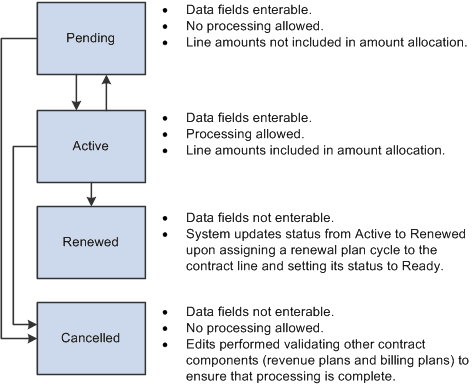
This diagram shows the flow between status values and functionality for each line status value:
The flow between status values and functionality for each line status value is showed
Saving the Line Status as Active
The system's edit checking does not prohibit you from saving a contract line with incomplete or invalid data. However, before you can set the contract to an active processing status, you must complete these activities:
-
Complete all required fields for the contract line.
-
Enter the start and end dates if the line is marked as renewable.
-
If the contract line has discounts or surcharges associated with it, complete the distribution code information; ChartField combination edits validate the distribution codes.
Note:
While not a prerequisite for contract activation, contract lines with a price type of Rate must have at least one project and activity associated with the line to price, bill, and recognize revenue for PeopleSoft Project Costing transactions.
Moving the Line Status to Renewed
The contract line status can only be set to Renewed by the system as part of the renewal process flow.
Moving the Line Status to Cancelled
Before you can set the contract line status to Cancelled, no (additional) Pending or Ready amendments can be related to the line.
In addition, for rate-based contract lines, the following conditions must be met:
-
No billing plan can be assigned to the line.
If a ling is assigned to a billing plan, you must set the billing plan status to Pending or Cancelled, and then unassign the line from the billing plan. If processing has already occurred against an assigned billing plan, the line cannot be cancelled.
-
No revenue plan can be assigned to the line.
If the line is assigned to a revenue plan, you must set the billing plan status to Pending, Reversed, or Cancelled, and then unassign the line from the revenue plan. If processing has already occurred against an assigned revenue plan, the line cannot be cancelled.
If you are cancelling an Active contract line that is associated with an active project and activity in PeopleSoft Project Costing, the system generates a warning. If you need to process additional transactions for any of the active projects and activities currently associated with the contract line that you are cancelling, you must remove those associated projects and activities from the contract line and associate them with another contract line. Otherwise, you can update the project status to Closed or the activity processing status to Inactive for the currently active projects and activities.
Additional Rules for Contracts with Prepayments
Two additional conditions exist for rate-based lines on contracts containing prepayments for which the prepayments have a status of Pending or Active:
-
The contract must contain at least one Active rate-based line.
-
You cannot cancel a rate-based line that is associated with a prepayment.