Milestone Statuses
A status is associated with PeopleSoft Contracts milestones and with milestone conditions. These two statuses work together to trigger the system when a milestone is available for processing.
This section discusses:
-
Milestone status types.
-
Milestone status values.
-
Auto-readying milestones.
-
Milestone status example.
-
Relationship to other statuses.
Milestone Status Types
Milestone status types include:
| Term | Definition |
|---|---|
|
Milestone Status |
You must set the Milestone Status field to Ready before the system can perform any processing against it. After the system processes a Ready milestone and confirms that the required conditions are met, the system changes the milestone status from Ready to Completed and no longer enables changes. When you enter a milestone, the milestone status is Pending by default. Note: The system automatically readies the milestone for certain milestone condition types when the milestone is created from a billing/revenue plan template. The system creates milestones with a ready status if the milestones are created from milestone templates that have a condition type of Date, SQL, or User Initiated linked to revenue/billing plan templates. However, depending on the milestone condition type, additional user level inputs may be required for these milestones to be processed by the system (CA_MS_PRCS), even if they are created with a ready status. You must assign a completion date for Date milestone condition types and you must manually select the Mark Complete button for User Initiated milestone condition types. |
|
Milestone Condition Status |
The Milestone Condition Status field is set by the system, except for user-initiated conditions. The system uses true or false criteria to set this condition. The criteria varies by condition type. When you create a milestone condition, its status is Ready by default. |
Milestone Status Values
Milestone status values include:
| Term | Definition |
|---|---|
|
Pending |
Milestones are ignored by the Milestone Processing Application Engine (CA_MS_PRCS). You can add or delete milestone conditions for milestones with a status of Pending only. |
|
Ready |
Milestones are processed by the Milestone Processing Application Engine. When you change the milestone status to Ready, and click the Save button, edit checking validates that you have correctly entered all fields for both the milestone and its conditions. If one of the milestone's conditions is another milestone, then you must also enter all relevant fields for the referenced milestone. After you set the milestone status to Ready, the system does not enable further edits to the milestone or any of the milestone conditions. If you need to make any changes, you must change the milestone status back to Pending. Note: If you created the milestone from a billing/revenue plan template, the system automatically sets the milestone status to ready if the milestone was associated with a milestone condition type of Date, SQL, or User Initiated and all required fields are complete. |
|
Completed |
The Milestone Processing Application Engine updates the milestone status to Completed after its conditions are met. After the system marks a milestone as Completed, the system does not enable further adds, changes, or deletions. A Completed milestone cannot have its status changed back to Pending. |
|
Cancelled |
Cancel a milestone before it's complete by manually setting the Milestone Status field to Cancelled. If you have manually set a milestone to Cancelled, the system does not enable further adds, changes, or deletions. A Cancelled milestone cannot have its status changed back to Pending. |
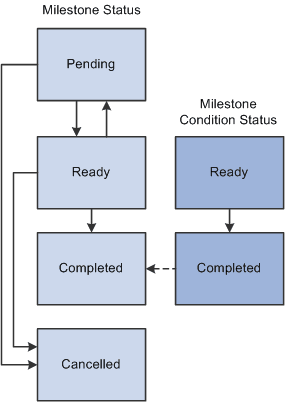
This diagram shows the milestone status and milestone condition status, and the relationships between the two:
The milestone status and milestone condition status, and the relationships between the two is shown
Auto-readying Milestones
When creating a milestone from a billing/revenue plan template, the system may automatically ready the milestone depending on the milestone condition type. This enables you to process the milestones that are created from billing/revenue plan templates without having to change the milestone status from pending to ready after activating the contract.
The system creates milestones with a ready status if the milestones are created from milestone templates that have a condition type of Date, SQL, or User Initiated linked to revenue/billing plan templates. The system creates milestones with a pending status if the milestone templates have a condition type of Milestone.
Even if milestones are created with a ready status, additional user-level inputs may be required in order for the milestones to be processed by the system (CA_MS_PRCS):
-
For milestones with a Date milestone condition type, you must assign a completion date after creating the milestone in order for the system to process the milestone.
-
For User Initiated milestones, you must select the Mark Complete button on the Milestones Conditions page to set the condition to a status of completed in order for the system to process the milestone.
-
For SQL milestones, the system picks up the milestone for processing based on the SQL that was predefined on the template. You can override the SQL on the Milestone Condition page before processing the milestone. No additional user inputs are required prior to processing.
Note:
The auto-readying of milestone applies to PeopleSoft Contracts-based milestones only. This feature does not apply to Project-based milestones since they cannot be linked to revenue/billing plan templates.
Milestone Status Example
Suppose that you enter a milestone with three milestone conditions and set the milestone to Ready status. You then realize that you need to change some of the milestone conditions. To change the milestone conditions:
-
Change the milestone status back to Pending.
-
Delete any conditions that you do not need.
The condition status is irrelevant in this case. However, you should note that if you delete a Completed condition and then redefine the same condition, the system displays the new condition with a default status of Ready.
-
Modify the conditions that you want to change.
-
Change the milestone status back to Ready.
Note:
When you change a condition, the system automatically resets that condition's status.
Relationship to Other Statuses
The only relationship between the milestone status and the other PeopleSoft Contracts statuses relates to revenue plan events and billing plan events. You can reference milestones to enable actions when the system sets a milestone status to Completed. Therefore, when you change the milestone status to Cancelled, the system performs edit checking to ensure that the milestone is not referenced on a revenue plan or a billing plan event. Additionally, edit checking ensures that the milestone is not referenced by another milestone's condition. If the milestone is referenced somewhere else, you cannot change its status to Cancelled.
Note:
If a PeopleSoft Project Costing milestone that is referenced by a contract is cancelled (inactivated) in PeopleSoft Project Costing, the user who is cancelling the milestone receives a warning that the milestone is referenced in a contract.