PeopleSoft Contracts Integration with PeopleSoft Billing and PeopleSoft Project Costing
PeopleSoft Contracts integrates with PeopleSoft Billing and PeopleSoft Project Costing, enabling you to generate invoices for all of your contract lines. PeopleSoft Contracts sends billing information for fixed-amount and recurring contract lines to PeopleSoft Billing. PeopleSoft Project Costing sends billing information for rate-based contract lines to PeopleSoft Billing. PeopleSoft Billing then generates invoices for the contract lines and sends information regarding the invoices back to PeopleSoft Contracts and PeopleSoft Project Costing.
The Contracts Billing Interface process selects billing plan lines (for fixed-amount, value-based, and recurring billing methods), or resource rows (for as-incurred billing methods) that have been marked in PeopleSoft Contracts as ready to bill, and it creates bill lines in the Billing interface tables. For rate-based billing methods, the Contracts Billing Interface process selects PeopleSoft Project Costing transaction rows that have analysis types in the PSWKS analysis group and have been priced. Once the Contracts Billing Interface process has staged the billing data in these tables, the Contracts Billing Interface processes the data to create bills.
The Contracts Billing Interface can create two types of bills: temporary bills and real bills. Temporary bills are routed to the billing worksheet, where the billing administrator can review and, for rate-based bills, amend the bills as needed before real bills are created. You cannot amend fixed-amount bills in the billing worksheet. However, it is still beneficial to view temporary fixed-amount bills in the billing worksheet, because temporary bills show the bill amount with the taxes calculated and with all activity grouped in the same invoices. Real bills become invoices that are sent to the customer. You have the option to create temporary or real bills for individual billing plans on the Billing Plan - Billing Plan General page by selecting or deselecting the Pre Approved check box.
You can use the billing worksheet to cancel temporary bills. When you cancel a temporary bill from within the billing worksheet, the system updates PeopleSoft Project Costing (if applicable) and PeopleSoft Contracts accordingly.
When you have finished reviewing a temporary bill in the billing worksheet, a real bill is created. When the bill is finalized, the system updates the PeopleSoft Project Costing PROJ_RESOURCE table, if applicable, and PeopleSoft Contracts CA_BP_XREF table.
The numbers in the following flowchart correspond to the updates that occur to the PeopleSoft Contracts controls (billing plans and billing events), the Billing Cross-reference table (CA_BI_XREF), and the PeopleSoft Project Costing table (PROJ_RESOURCE).
WARNING:
It is not recommended for you to make any billing adjustments to the contract lines outside the PeopleSoft Contracts system (for example, in PeopleSoft Billing or PeopleSoft Project Costing), as these changes will not flow back into PeopleSoft Contracts.
Here is the billing flowchart:
Contracts billing process flow diagram
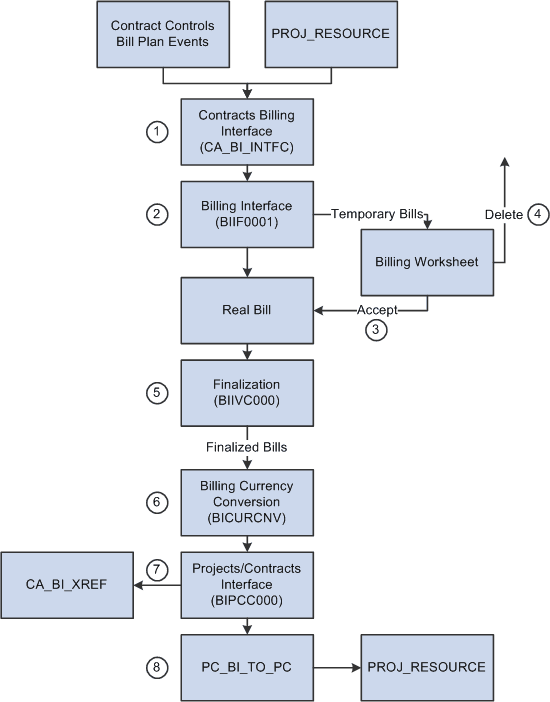
The billing process consists of these steps:
-
Run the Contracts Billing Interface process Contracts- and Project Costing-related billing activity to PeopleSoft Billing.
-
Run the Billing Interface process (BIIF0001) in PeopleSoft Billing to create temporary bills that you can work on in the billing worksheet.
The billing worksheet is a temporary work area where you can review and adjust resource lines that come from PeopleSoft Project Costing before you create an actual bill. For bill lines that are generated from fixed-amount contract lines, you can approve or delete the worksheet based on your review.
-
Approve the billing worksheet.
When you accept a billing worksheet, the system creates a real bill with an assigned invoice number and updates PeopleSoft Contracts and PeopleSoft Project Costing accordingly.
-
Delete the billing worksheet.
When you delete a billing worksheet, the system cancels the bill and updates PeopleSoft Contracts and PeopleSoft Project Costing accordingly.
-
Run the Finalization process (BIIVC000).
Run the Finalization process on the real bills that you have created. The Finalization process performs a variety of tasks, including calculating taxes, setting the invoice date, and calculating the due date.
-
Run the Billing Currency Conversion process (BICURCNV).
Billing Currency Conversion process (BICURCNV) must be run prior to running the Billing to Project Costing/Contracts Interface process (BIPCC000) to ensure that correct conversion rates are sent to project costing/contracts. For more information on Billing Currency Conversion process, see PeopleSoft Billing: Running the Currency Conversion Process (BICURCNV). You must run the Billing Currency Conversion process prior to running the Billing to Project Costing/Contracts Interface process even if you are not using multiple currencies.
-
Run the Projects/Contracts Interface process (BIPCC000).
After you have run the Finalization process, you run the Projects/Contracts Interface process. This process updates PeopleSoft Contracts and PeopleSoft Project Costing with the finalized bill information from PeopleSoft Billing and updates the billing plan event statuses to event billed.
-
Run the Billing to Projects process (PC_BI_TO_PC).
Run the Billing to Projects process for rate-based contract lines to update PeopleSoft Project Costing tables with billing data.
Note:
You can utilize streamlined billing to reduce the number of steps for invoicing bills. Streamlined billing enables you to process transactions from PeopleSoft Contracts to PeopleSoft Billing and back to PeopleSoft Contracts, with one job.
See Streamlined Billing.
Updates in PeopleSoft Contracts
Fixed-amount, value-based, and recurring bill rows are inserted into the Contract Billing cross-reference table as soon as the Contracts Billing Interface process is run; the status is then updated throughout the other processes: the Billing Interface process, Accept Worksheet process, Delete Worksheet process, and Projects/Contracts Interface process. Rate-based bill rows are inserted into the cross-reference table upon the running of the Projects/Contracts Interface process. This is because rate-based row amounts are subject to change throughout the billing process; fixed-amount rows are not to be changed, only accepted or deleted.
Related Topics
- PeopleSoft Billing: Understanding the Billing Interface Data Structure
- PeopleSoft Billing: Processing Billing Worksheets
- PeopleSoft Billing: Running the Billing to Project Costing/Contracts Interface Process (BIPCC000)
- PeopleSoft Billing: Running the Pro Forma, Finalization, Print, and Reprint Processes