Special Payment Terms Page
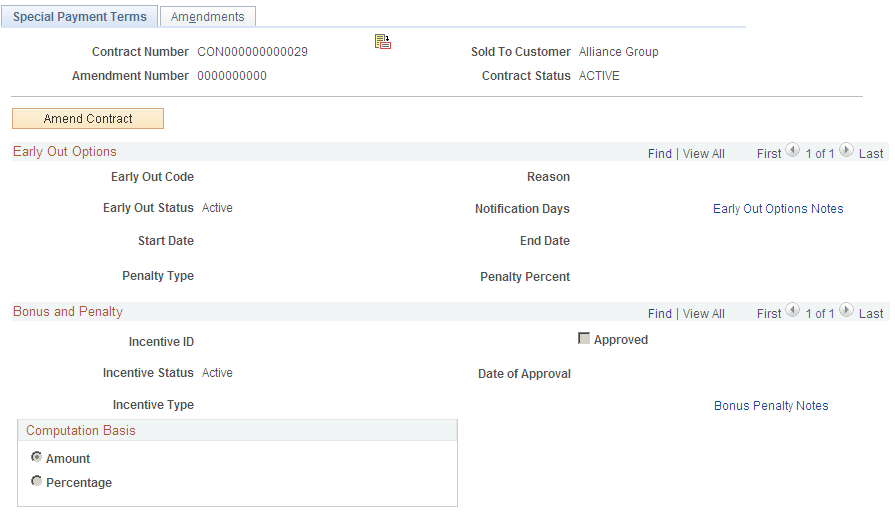
Use the Special Payment Terms page (CA_TERMS_PNL) to set up special payment terms by adding optional payment term details, such as bonus or penalty amounts and early out options, to the contract.
Navigation:
This example illustrates the fields and controls on the Special Payment Terms page. You can find definitions for the fields and controls later on this page.
| Field or Control | Description |
|---|---|
|
Amendment |
Displays the current amendment number and date of the amendment if this contract is amended through amendment processing. |
Early Out Options
Early out options specify the clauses under which a customer can terminate a contract before its completion. You can enter multiple early out options for each contract. For example, you might include a clause that gives customers a 30 days acceptance period in which they can terminate the contract for any reason, and also include a clause that runs for the lifetime of the contract in which customers can terminate the contract in case of bankruptcy.
| Field or Control | Description |
|---|---|
|
Early Out Code |
Select an early out code from the list of early out options that you define on the Define Early Out Options page. |
|
Reason |
If you select an early out code, the reason that you define for that code on the Define Early Out Options page appears. |
|
Early Out Status |
Select Active or Inactive. |
|
Notification Days |
Specify the number of days before the end date to flag an early out option that is near expiration. |
Select values for the Start Date and End Date fields to designate the time frame in which a customer may exercise the early out option. If the system date does not fall within the specified start and end dates, the specified early out option code does not apply.
| Field or Control | Description |
|---|---|
|
Penalty Type |
Select Amount or Percent. |
|
Penalty Percent |
If you selected a penalty type of Percent, you must enter a penalty percent. The system penalty is then calculated based on the total contract value. If you selected a penalty type of Amount, this field is unavailable for entry. |
|
Penalty Amount |
If you selected a penalty type of Amount, you must enter a penalty amount. The penalty is the amount that you specify here. If you select a penalty type of Percent, this field is unavailable for entry. |
|
Early Out Option Notes |
Click to create an internal note about the early out options. |
Bonus and Penalty Options
| Field or Control | Description |
|---|---|
|
Incentive ID |
Enter the ID for this bonus or penalty. |
|
Approved |
Select if the incentive is approved. |
|
Date of Approval |
Enter the date that this incentive is approved. |
|
Incentive Status |
Select Active or Inactive. |
|
Incentive Type |
Select an incentive type. Values are: Bonus: Incentive rewards the customer with a credit amount. Penalty: Incentive punishes the customer with a fee. |
|
Bonus Penalty Notes |
Click to create an internal note about the bonus or penalty. |
Computation Basis
| Field or Control | Description |
|---|---|
|
Amount |
Enter an amount if the incentive is a fixed amount. |
|
Percentage |
Enter a percentage if the incentive is for a percentage of the contract gross amount. |