Understanding Cost Structure
Costing structure determines how inventory transactions are calculated, where accounting entries are posted, and how many sets of books are maintained. PeopleSoft Cost Management gives you enormous flexibility in defining costing structure. You can choose to maintain any number of simultaneous books. Using different sets of books enables you to clearly track financial records, tax records, management records, and so on without any additional work. PeopleSoft Cost Management maintains all the books simultaneously.
PeopleSoft Cost Management also enables you to determine the type of costing by item, Inventory business unit, and cost book combination. This flexibility allows you to mix the type of costing within one inventory business unit. For example, one inventory business unit can have some items that use standard costing, other items that use actual costing, and so on. Also, one item can use different cost profiles in different business units.
In addition, the same item can be costed differently using different cost books within the same business unit. For example, an enterprise may want to track costs using local generally accepted accounting principles for financial reporting, and it may also want to track costs by using an internal activity based management model for decision-making purposes (product lines, marketing channels, target markets and so on). These two approaches can have different purposes and are often not compatible with each other; they each end with different answers as to what cost is. The power of the multiple book structure enables divergent cost approaches to be implemented in conjunction yet separate from each other.
This diagram illustrates the cost method relationships without using cost profile groups. Entering cost types and cost books on the Inventory business unit definition and defining the cost profile and cost element on the business unit item definition:
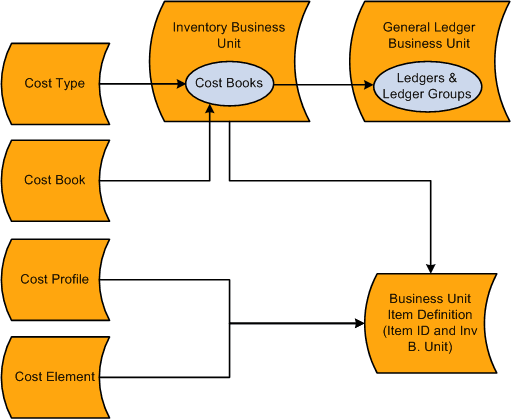
The diagram displays the different parts of the PeopleSoft Cost Management costing structure and how these parts are related to each other.
Cost Type
Cost types define a working space for cost calculations. You can define several different cost types, such as, current, revised, and forecasted costs. You calculate the cost of makeable items using cost types. Also, purchased items using the standard cost method can use cost type to calculate a standard cost. For example, in a manufacturing environment, cost books can use different cost types, enabling you to use GAAP rates for financial reporting and ABM rates for manufacturing reporting.
Cost Books
Define a separate cost book for each type of accounting records that you wish to maintain. For example, define a cost book for financial records, another cost book for tax records, management decision-making, and so on.
Inventory Business Units
When you define an inventory business unit, you identify the general ledger business unit that accepts the financial data. In addition, you define one or more combinations of cost books and ledger or ledger groups. The cost book is used to store accounting entries that are generated by inventory transactions. Each book enables you to use different cost methods; for example, a financials book can use standard costing for items, and the tax book can use LIFO costing for items. You can define any number of simultaneous books to be used within an inventory business unit. Each inventory transaction that has a financial impact creates a separate set of accounting entries in each book that is assigned to it. The accounting entries are then posted to the specified ledger or ledger group (set of books) within PeopleSoft General Ledger.
Cost Profiles
Define the methods that are used to value the inventory items, such as standard costing, actual costing, and so on. In PeopleSoft Cost Management, you assign cost profiles to items to determine the cost method. There are a number of options for cost profiles that you may mix and match to suit your requirements. Different items or groups of items within a business unit may use different cost profiles and the same item in different business units may also use different cost profiles.
Cost Elements
Cost elements are used to categorize the different components of an item's cost, such as material, landed, conversions costs, additional transfer costs, and so on. Also, cost elements define the debit and credit ChartFields for each cost component of an item so that accounting entries can be created.
Business Unit Item Definition
The cost profile can be added here or appear default from a cost profile group that is defined at the item definition level.
This diagram illustrates the cost method relationships when using cost profile groups. Cost type and cost book are defined on the inventory business unit and the cost profile and cost book are entered on the cost profile group. The cost profile group is added to the item definition. When a business unit item definition is created the information is applied from the item definition and the business unit. Leaving only the cost element to be defined at the business unit item definition.
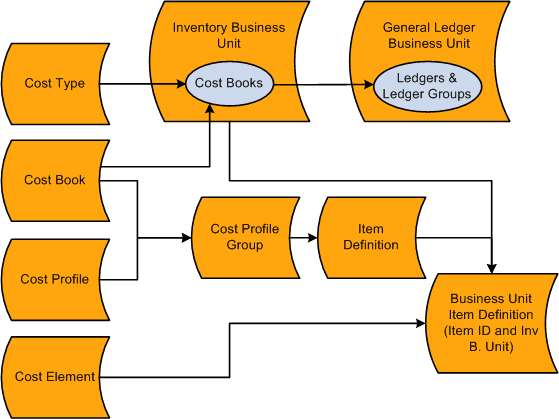
Cost Profile Groups
Cost profile groups are an optional step that enables you to define item costing for both efficient order entry and control. A cost profile group joins together a cost profile and a cost book that can be attached to multiple items. The cost profile group is attached to the Item Definition page, and then the cost profile group appears by default on the item's definition by inventory business unit, the Define Business Unit Item component. If the item uses the same cost profile and cost book across several inventory business units, then the cost profile group reduces the time that is needed to define item costing. Also, when defining a cost profile group you have the option to prevent users from changing the default cost profile and cost book on the Define Business Unit Item component; giving you a level of control over item setup.