Understanding Production Costs
The Cost Rollup process can calculate the costs for make or buy items within a manufacturing or distribution environment. These new costs are temporarily stored in the CE_ITEMCOST and CE_ITEMCOST_DET tables where you can review them using several PeopleSoft inquiry pages. If you discover that the new standard costs are incorrect, then you can change the cost foundation, bill of materials (BOM), or routings and then run the Cost Rollup process again. Once you are satisfied with the results, run the Update Production job (CEREVAL) to move the new standard costs into the CM_PRODCOST table that the system uses to cost manufacturing and inventory transactions. The new frozen standard costs are used for future manufacturing, production variances, and valuing inventory. Both the Cost Rollup and Update Production processes accommodate yield by operation transactions by calculating yield loss costs at the operation sequence level, maintaining extended precision cost fields, and storing detailed cost rollup calculations.
For production IDs, completions are recorded at the last operation. Completed items from Work in Process (WIP) are putaway as finished goods. These putaways are posted to TRANSACTION_INV. Completions may also be directed into another production ID.
If the end item is standard cost, the system debits the standard costs to finished goods and credits WIP. This may leave a remainder in WIP if the standard is different than the cost in the production ID. This remainder is cleared from WIP as a variance. When production IDs are closed for accounting, the variances between standard and production costs are computed by the Production Close process and stored in the SF_VARIANCES record. These variance transactions account for the difference between the standard cost of the end items putaway into finished goods and the total costs of the components, plus conversion cost consumption. WIP is cleared either to finished goods or as a variance for all completed and closed production IDs.
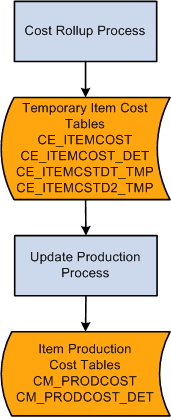
This diagram illustrates setting up frozen standard costs for makeable items. The Cost Rollup process calculates the frozen standard costs and stores the costs in the temporary item cost tables for review. The Update Production process (Cost Update/Revalue process page) moves the new standard costs into the production tables used to cost manufacturing and inventory transactions:
Once you have set the foundation for costing, you can calculate and update item costs. In a manufacturing environment, PeopleSoft Cost Management supports standard costing and enables you to easily perform cost simulations, standard cost updates, inventory, inspection, and WIP revaluations using a system that is well interfaced with other PeopleSoft Supply Chain Management applications.
Within a standard cost environment, you calculate the cost of makeable items based on the cost of purchased items, the makeable items product structure, and the list of tasks necessary to put the components together to form the subassembly or assembly.
Once you calculate and approve the item costs, you must put them into effect as the new frozen standard cost in production. Costs based on engineering bill of materials (EBOM) are calculated but are not used to update the standard cost for the item in production. When you have completed this process, PeopleSoft Cost Management revalues all inventories in the inspection, raw material, WIP, and finished goods storage areas at the new standard cost. Additionally, PeopleSoft Cost Management revalues any assemblies or subassemblies in process in production at the new standard. PeopleSoft Cost Management also records an accounting transaction to adjust the general ledger (GL) inventory balances.
You can maintain many standard costs for various production options and cost approaches, however, there is only one frozen standard cost per item that transcends all standard cost profiles and cost books for a business unit.
When production begins, PeopleSoft Cost Management tracks the cost of production, including any variances from the expected results. You have visibility into potential production variances before production is completed, which gives you time to analyze potential problems before they are booked to the GL.
Related Topics