Using the Cost Rollup Process to Calculate Product Costs
The Cost Rollup process calculates the standard cost for an item based on:
| Field or Control | Description |
|---|---|
|
Bill of Materials (BOM) |
The BOM contains the component materials for the end item. These component material costs can be purchased components and subassemblies (both manufactured and subcontracted). The Cost Rollup process includes the cost of purchased items, the lower-level costs of manufactured subassemblies, and the cost of subcontracted assemblies. For configured items, the component list from the production order is used instead of the BOM. |
|
Routing |
(Optional) The routing contains information about the operations and work centers required for producing the item. Associated with the routings are the labor, machine, subcontracting, and overhead rates that the system uses for the cost rollup of a particular cost type and version. The Cost Rollup process uses the costing rate type for labor and machine setup, run, fixed run, and postproduction times or rates. For configured items, the system uses the operation list from the production order instead of the routing. |
This diagram illustrates the calculation of the cost of manufactured items. The Cost Rollup process calculates the standard cost based on the BOM and routing of the item. The cost type and cost version combination determine the rates and additional costs used to calculate the cost:
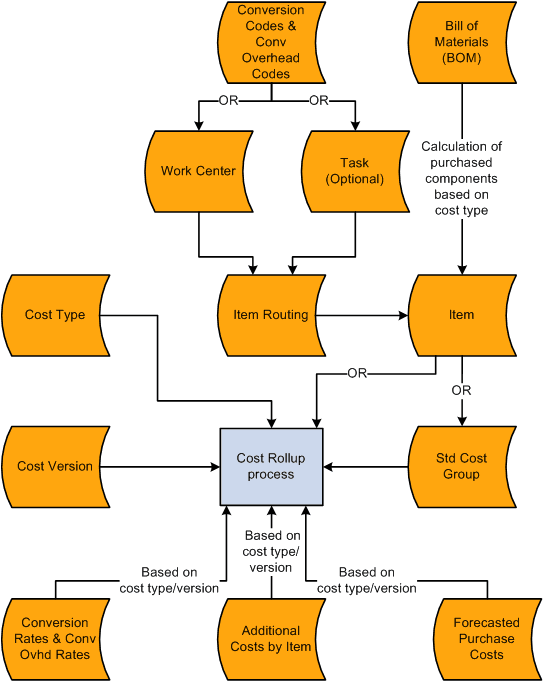
The Cost Rollup process uses several elements to compute the frozen standard costs, including:
| Field or Control | Description |
|---|---|
|
Cost Type |
Define different cost types, such as current, revised, and forecasted costs, to create a working space for cost calculations. You perform cost rollups based on cost types. For example, you can set up a cost type of CUR for the current production costs. |
|
Cost Version |
Cost versions are a subset of cost types that enable you to have different versions or simulations of the costs. For example, for the cost type CUR (current production costs), you could have a current production version (PRD1) and an engineering version (ENG1) for cost calculations. |
|
Cost Element |
Cost elements categorize the different components of an item's cost, such as, material, labor, and machine costs. They are used on reports and inquiries of the rolled up costs of a manufactured item. They can also be used to post accounting entries for inventory transactions. You could create the cost elements, for example, 300 for recording labor setup costs, 301 for recording labor run, and 501 for overhead - machine based costs. |
|
Production Conversion Codes |
Production conversion codes define labor, machine, and other conversion costs in the manufacturing process. Use conversion codes to define conversion rates associated with work centers or tasks. For example, you could create the conversion code 4403 (painter) for conversion costs related to painting. |
|
Production Overhead Codes (conversion overhead codes) |
Production overhead codes define the different types of overhead costs that are used in the manufacturing process. Use conversion overhead codes to define conversion overhead rates associated with work centers or tasks. For example, you could create the production overhead codes of 6504 for depreciation and 6507 for electricity usage. |
|
Costing Conversion Rates |
Define the rates to use for labor and machine costs in the production process. You can create a variety of costing scenarios using different cost types, cost versions, and production conversion codes. For example, you can set the labor setup rate to 8 per hour for the CUR cost type, PRD1 cost version, 4403 (painter) conversion code, and store the results in the cost element 300 (labor setup). Then you can create a different labor run rate of 9 per hour for the CUR cost type, PRD1 cost version, 4403 (painter) conversion code, and store the results in the cost element 301 (labor setup). |
|
Costing Conversion Overhead Rates |
Establish the rates to use for overhead costs based on the units produced, labor or machine hours, or labor or machine costs. You can establish several different rates based on business unit, cost type, cost version, conversion overhead code, and cost element. For example, you can set up the depreciation costs as 5 /machine hour for the CUR cost type, PRD1 cost version, 6504 (depreciation) conversion overhead code, and store the results in the cost element 501 (overhead - machine based). |
|
Work Centers and Tasks |
Once you have set up the cost foundation, use the production conversion codes and the production overhead codes to define the labor and machine cost for the work centers or tasks. You can specify up to four production overhead codes for the work center or task. For example, for the work center, PAINT01, you can add the conversion code 4403 (painter) for conversion costs related to painting. You can also add the conversion overhead code of 6504 for depreciation on the paint machines. |
|
Item Routing |
You then define the item's routing to include these work centers and tasks within the operation sequences. The routing also defines the operation time for any operation sequence. For example, for the operation sequence 50, you could record that is takes 2 hours of labor setup, 4 hours of labor run, and 1 hour of machine time. |
|
Item |
The item definition for a manufactured item includes the item routing to be used and the BOMs. This information is recorded on the Define Business Unit Item - Manufacturing page. For example, for the item SR1001 (touring bike) this page defines where to get the item routing and BOM. |
|
Cost Rollup Process |
The Cost Rollup process uses the item routing, cost type, and cost version to determine the labor, machine, subcontracting, and overhead costs. For example, if the cost rollup process uses the cost type of CUR and the cost version of PRD1, with the item ID SR1001, then the conversion costs for the operation sequence 50 would be:
|
The Cost Rollup process must calculate the cost at each level of the product structure, as well as the final cost. For example, if an item has a BOM or component list like the one in this diagram, the cost rollup must calculate the cost of item 2002 before it can calculate the cost of item 1001.
This diagram illustrates the cost rollup of a multi-level product structure:
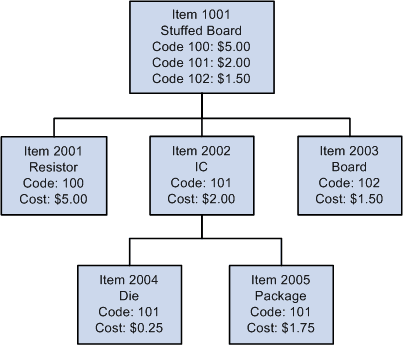
In this example, the costs associated with items 2004 and 2005 would be lower-level or component-level costs for item 2002. The cost of 2002, when you add it to items 2001 and 2003, becomes the lower-level or component costs for item 1001. The labor, machine, and overhead costs associated with manufacturing item 2002 are this-level or assembly-level costs for 2002. However, they would become lower-level or component-level costs when associated with item 1001. Item 1001 would have its own set of this-level or assembly-level costs, associated with putting items 2001, 2002, and 2003 together.