Basic Arbitration Plans
You can use the arbitration plan to filter the price rules that are applied to the transaction. The definition of the arbitration plan nodes and the placement of the decision nodes determine the filtering power of the arbitration plan. To verify that the arbitration plan is performing as you expect, use the pricing simulator to test the arbitration plan and price rules.
Arbitration Plans That Address Discounts Only
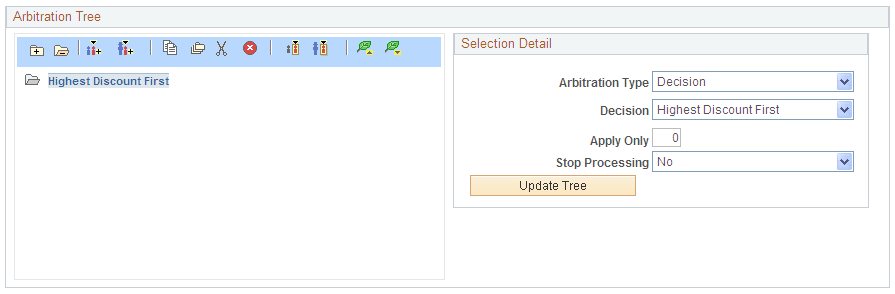
A basic arbitration plan tells the system how to sort all price rules with conditions that match the transaction. There are numerous decision arbitration types. The following example uses the "Highest Discount First" decision:
This example illustrates the fields and controls on the Example of the Arbitration Tree section of the Arbitration page showing Highest Discount First.
If you are certain that price rules are defined only for discounts and not for price overrides or giveaways, then you can define the arbitration plan this simply. However, if your price rules are more complex, then you will need a more complex arbitration plan.
Arbitration Plans That Apply Highest/Lowest Discount Only and Then Stop
If you have more complex price rules but you only want to apply the highest/lowest discount and stop processing price rule sorting and filtering after that, then set the stop processing option.
To define an Arbitration Plan that limits the applied adjustments and then stops the arbitration process:
-
Add a Highest Discount First or Lowest Discount First decision to the arbitration plan.
-
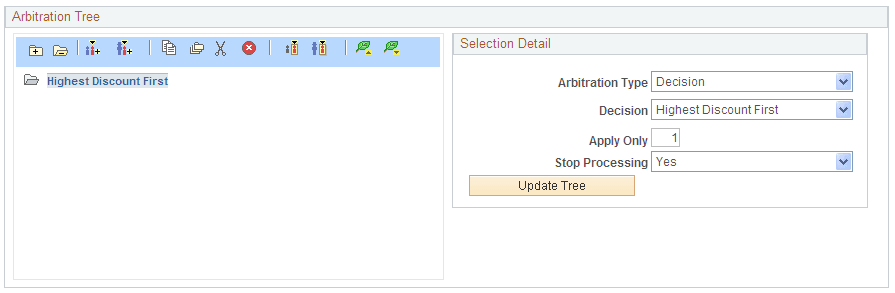
Set the Number of Adjustments to Apply field to 1.
-
Select Yes in the Stop Processing field to ensure that the arbitration plan does not apply any more adjustments beyond the highest/lowest discount.
The following example defines an Arbitration Plan that limits the applied adjustments and then stops the arbitration process:
This example illustrates the fields and controls on the Example of the Arbitration Tree section of the Arbitration page showing Highest Discount First and Stop.