Process Flow for Changing Requisitions and Creating Change Requests
The following diagram illustrates the process flow for changing a requisition:
This diagram illustrates the process flow for changing a requisition.
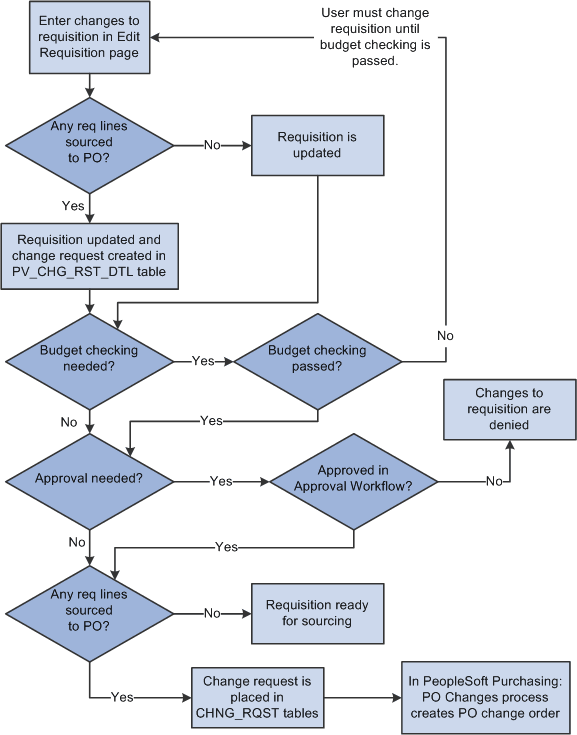
The business process flow for changing a requisition includes:
-
Use the Edit Requisitions component to make changes to the original requisition. When you save your changes the requisition is updated. If you are using the Change Tracking feature, then you can use the View Requisition Change Tracking History page to compare the original requisition to the changed requisition.
-
If commitment control is used, then the requisition must pass budget checking before the requisition changes can move forward. The PeopleSoft commitment control feature enables you to check expenditures against a predefined budget. In PeopleSoft eProcurement, these expenditures occur when a requisition is entered and a pre-encumbrance or encumbrance is established.
For requisition lines that have not been sourced to a purchase order (that is, requisition lines with the status of open, pending, or approved), the requisition is updated but no change request is created. Based on the Reapprove check box on the requisition change template for this business unit, the requisition may require re-approval by the approval workflow framework. Keep in mind that you cannot change a requisition line that has been sourced to a material stock request in PeopleSoft Inventory.
-
For requisition lines that have already been sourced to a purchase order, the requisition is updated and a change request is created. This change request is placed in the PV_CHNG_RST_DTL table with a status of pending.
-
The Approval Workflow Framework feature is used to route the changed requisition to the correct people for approval or denial. The requisition change template identifies the field changes that require a re-approval of the requisition. If one approver denies the requisition or requisition line, then the changes are removed from the requisition, the change request is canceled, and the business process flow ends. If the changed requisition passes all approvals, then the Approval Workflow Framework sets the requisition to the approved status. For a requisition that has not been sourced to a purchase order, this completes the process flow. If the requisition has been sourced to a purchase order (and a change request was created) then the status of the change request in the PV_CHNG_RST_DTL table is changed from pending to approved. In addition, the change request is also placed in the CHNG_RQST and CHNG_RQST_DTL tables to be picked up by the Change Purchase Orders process.
Note:
If budget checking and approval workflow are not needed, then the change request is placed in the PV_CHNG_RST_DTL, CHNG_RQST and CHNG_RQST_DTL tables when the changed requisition is saved.
-
In PeopleSoft Purchasing, the Change Purchase Order process picks up the change requests in the CHNG_RQST, and CHNG_RQST_DTL tables, updates the purchase order, and might create a change order for a dispatched purchase order.