Recently Dispatched RFQs Pagelet
Use the Recently Dispatched RFQs pagelet (WV_PE_RFQ_PGLT) to display recently dispatched RFQs.
You must first create RFQs in PeopleSoft Purchasing, and assign the RFQ to the supplier using the Dispatch Supplier List or the Item Supply Supplier List.
Navigation:
Click the Customize button on the Recently Depicted RFQ supplier-facing pagelet.
This example illustrates the fields and controls on the Recently Dispatched RFQs pagelet.
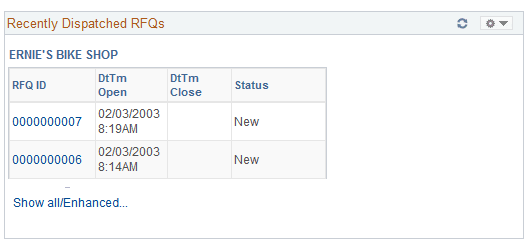
Displays recently dispatched RFQs. You must first create RFQs in PeopleSoft Purchasing, and assign the RFQ to the vendor using the Dispatch Supplier List or the Item Supply Supplier List.
| Field or Control | Description |
|---|---|
|
RFQ ID |
Click a linked RFQ ID value to access the Request For Quote List page. |
|
DtTm Open (date and time open) and DtTm Close (date and time close) |
The date and time when the RFQ becomes open or closed for supplier response. |
|
Status |
Displays the status of the RFQ. Statuses are:
|
| Field or Control | Description |
|---|---|
|
Show all/Enhanced |
Click to access the Review Request for Quotes Filter Options page. |