Adding Expense Tiles for Insights Dashboards
When adding Insights dashboard tiles to a Expenses homepage, access the Travel and Expenses folder. PeopleSoft Expenses provides these tiles:
-
Travel Policy Violations, see Travel Policy Violations Dashboard.
-
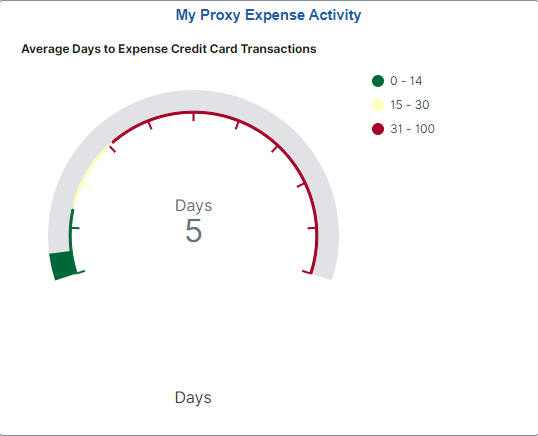
My Proxy Expense Activity, see My Proxy Expense Activity Dashboard.
-
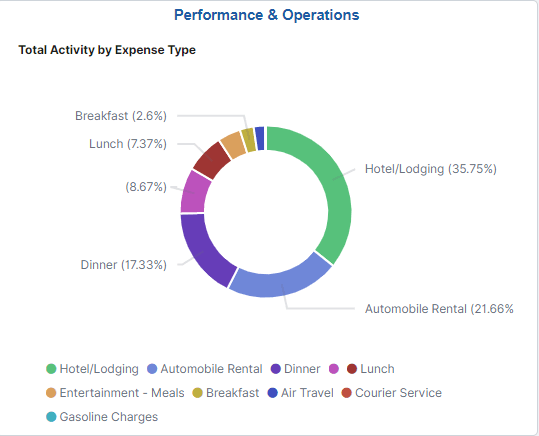
Performance & Operations, see Performance & Operations Dashboard.
For additional information about how to add a tile to a PeopleSoft Fluid Home page, see Application Fundamentals: Adding Homepages and Tiles and PeopleTools: Application User’s Guide, “Working With PeopleSoft Fluid User Interface”, Working with Fluid Homepages and Dashboards, Managing Tiles on Fluid Homepages and Dashboards.
This example illustrates the Travel Policy Violations Tile.
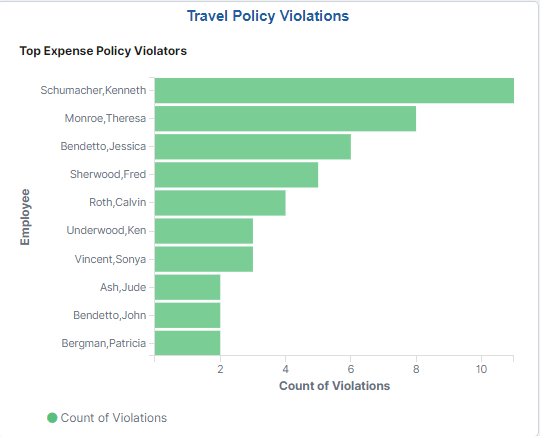
Violation counts are based on Exception and Risk setup, such as those displayed on the Approve Expense Report - View Exception Comments and Risks Page.
This example illustrates the My Proxy Expense Activity Tile.
This example illustrates the Performance & Operations Tile.