SEPA Credit Transfer and Direct Debit Initiation
To initiate a SEPA Credit Transfer or SEPA Direct Debit, PeopleSoft Financial Gateway delivers predefined payment layouts in the Layout Catalog.
-
Credit transfer initiation layouts for SEPA include these:
-
SEPA_CT (SEPA Credit Transfer, Pain.001.001.02)
-
SEPA_CT_03 (SEPA Credit Transfer V3, Pain.001.001.03; adheres to Rulebook 6.0)
-
SEPA_CT_CH (Swiss Specific Customer Credit Transfer, Pain.001.001.03.ch.02)
-
SEPA_CT_09 (SEPA Credit Transfer Initiation, Pain.001.001.09)
-
-
Direct debit initiation layouts for SEPA include these:
-
SEPA_DD (SEPA Direct Debit, Pain.008.001.01)
-
SEPA_DD_02 (SEPA Direct Debit V2, Pain.008.001.02; adheres to Rulebook 6.0)
-
SEPA_DD_2B (SEPA Direct Debit B2B, Pain.008.001.02, Business to Business Version)
-
SEPA_DD_08 (SEPA Direct Debit Initiation, Pain.008.001.08)
-
PeopleSoft Financial Gateway also delivers predefined ISO payment formats in the Layout Catalog. ISO 20022 layouts are generic layouts, which are used for credit transfers and direct debits that are not related to SEPA.
-
Generic credit transfer initiation layouts include these:
-
ISOV2 (ISO 20022 Credit Transfer V2, Pain.001.001.02)
-
ISO_CT_03 (ISO 20022 Credit Transfer V3, Pain.001.001.03)
-
ISO_CT_05 (ISO 20022 Credit Transfer V5, Pain.001.001.05)
-
ISO_CT_09 (ISO 20022 Credit Transfer Initiation, Pain.001.001.09)
-
-
Generic direct debit initiation layouts include these:
-
ISOV2_DD (ISO 20022 Direct Debit, Pain.008.001.01)
-
ISO_DD_02 (ISO 20022 Direct Debit, Pain.008.001.02)
-
ISO_DD_08 (ISO 20022 Direct Debit Initiation, Pain.008.001.08)
-
For a complete list of delivered payment layouts, including SEPA, ISO, and miscellaneous formats:
See Understanding the Layout Catalog.
These SEPA layouts dispatch payments electronically as XML messages from PeopleSoft Financial Gateway using the Credit Transfer Initiation Message or the Customer Direct Debit Initiation Message. The PeopleSoft payment methods ACH (Automated Clearing House), WIR (Treasury Wire), and EFT (Electronic File Transfer) support the SEPA credit transfer layouts and the direct debit payment method supports the SEPA direct debit layouts.
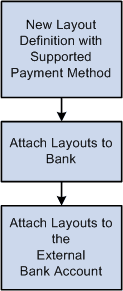
To enable PeopleSoft Financial Gateway to perform SEPA credit transfers and direct debits, you must access the Bank Integration Layouts page and associate each layout with an existing bank. Once the layouts are set up for a selected bank, they can be used with any bank accounts associated with that bank. You must access one or more external bank accounts that you want to set up to perform SEPA credit transfers or direct debits and attach the layouts to the bank account.
For example, you might access the Collections page of a bank account associated with a French bank, select Direct Debit as the Payment Method, and select SEPA_DD as the payment layout. This is also where you indicate that you want to dispatch the direct debit transaction electronically using PeopleSoft Financial Gateway.
Process flow for payment layouts
Using InterAct to Initiate Payments Through SWIFTNet
If you use InterAct to send payments through SWIFTNet, you have the option to generate an envelope around selected ISO and SEPA messages. The envelope is provided as a layout property, and the layout property indicates whether the InterAct version is required or not.
The Financial Gateway system creates a message header envelope in addition to the existing message body upon payment dispatch for these layouts:
-
Credit Transfer messages: ISOV2, ISO_CT_03, ISO_CT_05, ISO_CT_09, SEPA_CT, SEPA_CT_03, SEPA_CT_CH and SEPA_CT_09.
-
Direct Debit messages: ISOV2_DD, ISO_DD_02, ISO_DD_08, SEPA_DD, SEPA_DD_02 and SEPA_DD_08.