Define Standard Journals Page
Use the Define Standard Journals page (SJE_STNDRD_JRNL) to create a standard journal entry.
Enter a standard journal ID that becomes the high-level key for all journal entries generated using this definition.
Navigation:
This example illustrates the fields and controls on the Define Standard Journals page. You can find definitions for the fields and controls later on this page.
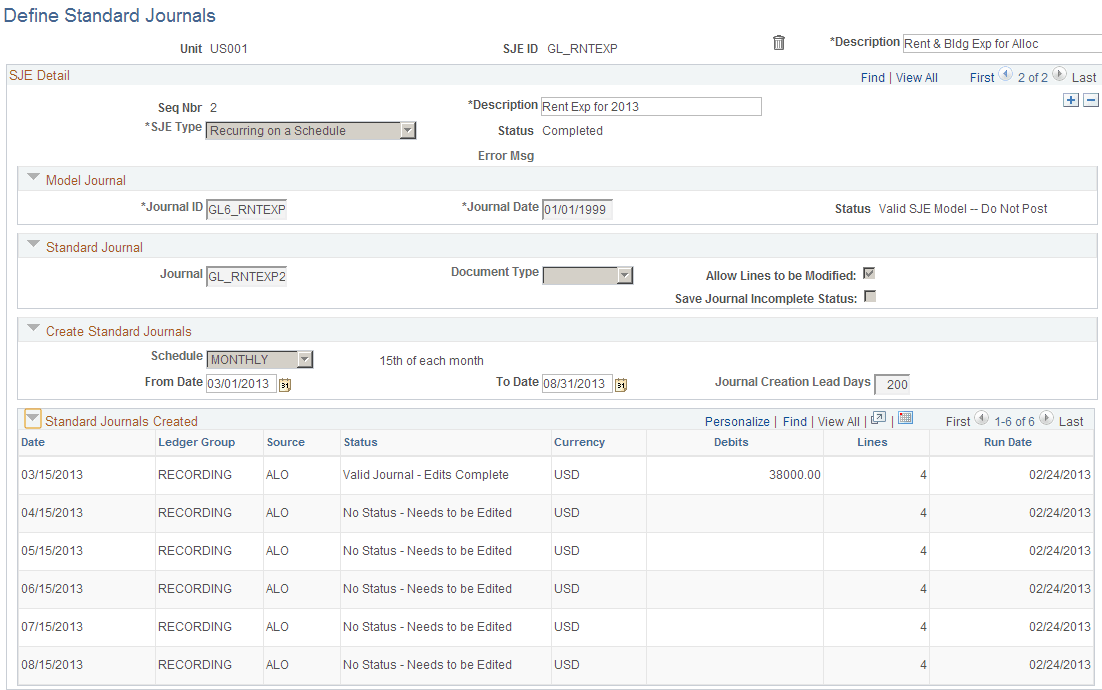
| Field or Control | Description |
|---|---|
|
SJE ID (standard journal entry identification) |
Displays the SJE identification value. Use the long description field to the right to describe this SJE. |
|
Seq Nbr (sequence number) |
Displays the number of the SJE detail. The next field is a description of this detail. One SJE may have multiple SJE details. |
|
SJE Type (standard journal entry type) |
Select the type of the SJE. Values are: Template: General Ledger uses a template as a data entry model for other journal entries. You can automatically reproduce it on a fixed schedule as with recurring SJEs, or you can use it on request. When you define the template, specify whether you want the ChartField values copied from the model to the generated journal entry. Examples of templates are monthly payments with different amounts such as telephone and utilities. Recurring:A recurring journal entry is any entry that should be automatically recorded in its entirety according to a fixed schedule. These entries contain the same ChartField values and amounts, such as monthly rent, lease payments, and depreciation expense. Spread: In a spread journal entry, the total amount is spread proportionately across all the periods. For example, suppose that a company charges you a flat fee of 10,000 USD annually to perform a service. Use this type to divide that amount by 12 and create recurring entries for the same amount each month. Spread-Day: In a spread-day journal entry, the total amount is spread across the months in proportion to the number of days in each month. For example, assume that a company charges you a flat fee of 10,000 USD annually to perform a service. The amount charged for expense each month corresponds to the product of the result of 10,000 divided by 365 times the number of days in the month. |
|
Status |
Displays one of the following statuses: Active: When you first create an SJE, its status is active. The SJE may have more journals to be created. Error: This status indicates that an error occurred the last time the Standard Journal process attempted to process this SJE. The SJE continues to display a status of error until the next time the batch process is run after the problem causing it is fixed. Completed: All the standard journals for this SJE have been created. A SJE with this status may still be modified. To do this, reactivate the SJE and extend the range of dates or periods. |
|
Model Journal |
Specify the model journal for the SJE. This model journal must belong to the same unit as the SJE. Once you select your journal and date, the model journal status appears. Your model journal must conform to the following requirements:
|
|
Standard Journal |
Enter the journal ID for the SJE. Also enter the document type that you used for document sequencing for the standard journals. |
|
Document Type |
Select the document type. |
|
Allow Lines to be Modified |
Controls whether the standard journals can be modified before being posted using the Journal Entry page. Deselect this check box to prevent standard journals from being modified. |
|
Save Journal Incomplete Status |
Select to save this journal as incomplete. |
|
Create Standard Journals |
Specify the sequence of dates of the standard journals to be created. |
|
Schedule |
If the SJE type that you specified is either Template or Recurring, the Schedule field appears, enabling you to enter the frequency of your SJEs. In the From Date and To Date fields, enter the range of your SJEs. |
|
From Date and To Date |
If your SJE type is spread, designate the range of periods in these fields. |
|
Journal Day in Calendar Period |
Enter the day to establish a journal date for the standard journals. For example, when you enter 20 in this field, you indicate to the system that you want the journal date of the standard journals to be the 20th day of each period. This designates the journal date only, not the date on which the system creates the standard journal. |
|
Journal Creation Lead Days |
Enables you to create standard journals in advance. Enter the number of days in advance of the journal date that you want the standard journals to be ready for creation. If you leave this field blank, the system creates the standard journals on the journal date. If you must change the details, such as ChartFields, dollar amounts, or statistical amounts on standard journals, use one of these two options:
|
|
Standard Journals Created |
Displays the SJEs and their statuses. |