Integrating Fusion Accounting Hub to PeopleSoft General Ledger
This integration allows you to use Oracle Fusion Accounting Hub to transform information from non-Oracle source systems (transaction systems) into accounting entries, and then transfer the accounting entry lines (or any third party accounting entries) to PeopleSoft General Ledger for posting. As a result, you can take advantage of Fusion Accounting Hub accounting transformations while still using PeopleSoft General Ledger as the system of record for financial reporting and analysis.
Once configured and implemented, this integration enables you to perform the following functions:
-
Process accounting entries from Fusion Accounting Hub (or any third party system) to PeopleSoft General Ledger journals.
-
Perform Balancing and ChartField Combination validation with error reporting during processing.
-
Create InterUnit and IntraUnit balancing entries.
-
Drillback, manage and review Fusion (or other third party) accounting entries.
-
Apply ChartField Mass Change rules to modify ChartField values for accounting entries before running Journal Generator.
The diagram pictured here represents a high-level process flow for the functions that this integration performs once implemented:
This example illustrates the fields and controls on the Oracle Fusion Accounting Hub. You can find definitions for the fields and controls later on this page.
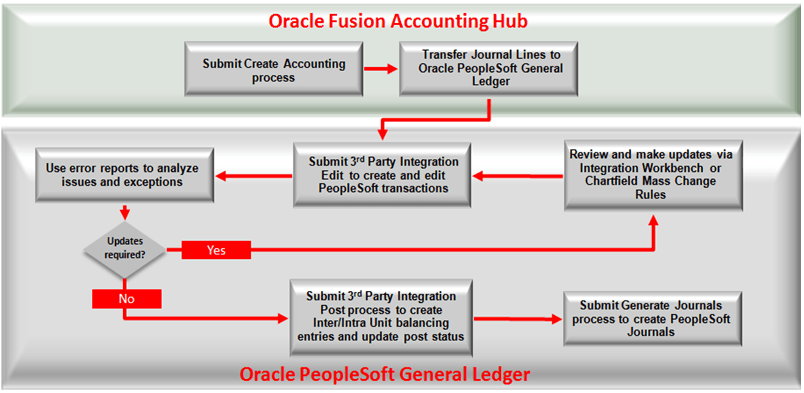
This process flow depicts the ongoing steps performed by this integration (once configured) within the respective applications at regular intervals, depending upon operational considerations (such as your organization’s accounting close cycle):
Oracle Fusion Accounting Hub Processing:
-
The standard Fusion Accounting Hub Create Accounting process creates the detailed accounting entries. Once the journals are final, they are eligible for transfer to PeopleSoft General Ledger. Only Actuals journals are eligible for transfer.
-
Transfer Fusion Accounting Hub entries to PeopleSoft General Ledger.
PeopleSoft General Ledger Processing:
-
Submit the PeopleSoft 3rd Party Integration Edit process, which extracts data from Fusion Accounting Hub records and inserts data into the Accounting Entry Definition record to be used by the PeopleSoft Journal Generator in creating PeopleSoft General Ledger journals. The process also edits ChartField combinations and applies ChartField Mass Change Rules as configured.
Note:
You have the option to run the 3rd Party Integration Edit process and the 3rd Party Integration Post process in the same step. In this case, the valid entries are posted automatically. Once the entries are posted, they cannot be changed. Only invalid entries can be changed and reprocessed. In contrast, if you choose to run the 3rd Party Integration Edit without invoking the posting process in the same step, you have the opportunity to change the entries before posting.
-
Submit the PeopleSoft 3rd Party Integration Post Process Request.
-
Inquire on PeopleSoft journals from the External Accounting Integration Workbench.
-
Optional Steps:
-
Run Integration Error Report
-
Run Combo Edit Error Report if ChartField combination edits are enabled
-
-
Submit the PeopleSoft Generate Journals Request to create the PeopleSoft journal entries from the posted accounting entries.