Journal Error Processing
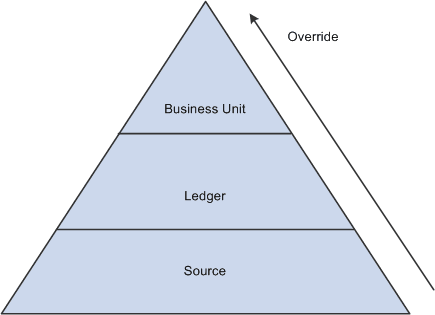
Journal error processing options are available at the business unit, ledger for a unit, and source levels. Error processing options that are defined at the ledger level (Ledgers For A Unit component) override those defined at the business unit level; error-processing options defined at the source level override options defined at both the business unit and ledger levels.
This diagram illustrates the override hierarchy for journal error processing:
Journal Error Processing Override
The Suspend journal error processing option can be set for these errors:
| Term | Definition |
|---|---|
|
Journal Balance Errors |
A journal balance error occurs when an unbalanced journal is created with a ledger that is defined as a balanced ledger. If the Suspense option is set, the system generates a suspense line to bring the journal into balance. This suspense line is referred to as a balance suspense line. |
|
Journal Edit Errors |
A journal edit error occurs if the journal line has an invalid ChartField value or ChartField combination. If the suspense option is set, a suspense line is generated for each line that is in error. This suspense line is referred to as an edit suspense line. |
|
Journal Amount Errors |
A journal amount error occurs if a foreign currency journal line has different signs on foreign amount and monetary amount. If the suspense option is set, a suspense line is generated for each line that is in error. This suspense line is referred to as an amount suspense line. |
At any level, you can select the ChartFields and ChartField values for your amount, balance, and edit suspense. The Journal Edit process creates the suspense lines with the ChartFields and ChartField values you selected.