Ledger Mapping Page
Use the Ledger Mapping page to map each combination of PeopleSoft General Ledger business unit and PeopleSoft ledger to a Fusion ledger.
Navigation:
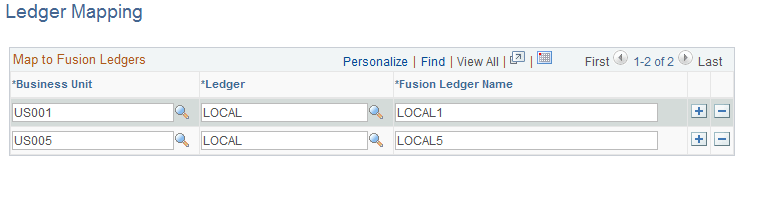
This example illustrates the fields and controls on the Ledger Mapping Page. You can find definitions for the fields and controls later on this page.
| Field or Control | Description |
|---|---|
|
Business Unit |
Select the PeopleSoft business unit of the ledger that you want to map to a given Fusion ledger. |
|
Ledger |
Select the PeopleSoft ledger for the corresponding business unit that you want to map to a given Fusion ledger. |
|
Fusion Ledger Name |
Enter the Fusion ledger name exactly as it exists in Fusion Accounting Hub. You can map more than one Fusion ledger to the same PeopleSoft Business Unit/Ledger combination. |
Note:
If a General Ledger business unit and ledger combination is omitted from this mapping, the related accounting entries will be in error and Fusion Accounting Hub must reprocess these entries after the ledger mapping has been updated.
Note:
Manually maintain synchronization of ledgers, calendars, and accounting periods within the respective systems (PeopleSoft and Fusion (3rd party)). You should manually synchronize on a regular basis to ensure that all control data are mapped correctly between the two systems.
Note:
For more information, see the “Fusion Accounting Hub Integration with PeopleSoft General Ledger” white paper: Create Calendars, Charts of Accounts, and Ledgers.