Pagelet Personalization Pages
Use the Pagelet Personalization pages (FSPC_USER_MYWORK; FSPC_USER_LINKS; FSPC_USER_QUERY; and FSPC_USER_REPORT) to personalize your pagelet display settings, such as link display order, show count, show link, start group collapsed, and so on. There is a separate personalization page for each of the delivered pagelets in the PeopleSoft Classic General Ledger WorkCenter.
Navigation:
Click the Pagelet Settings button on the My Work pagelet, the Links pagelet, the Queries pagelet, or the Reports/Processes pagelet. Select Personalize.
This example illustrates the fields and controls on the My Work Pagelet Personalization page. You can find definitions for the fields and controls later on this page.
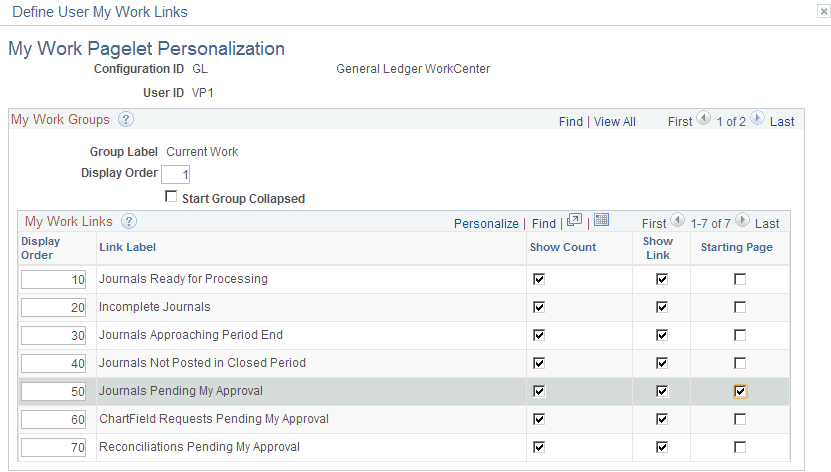
You can configure your WorkCenter to display the links according to your needs for each of the four pagelets (My Work, Links, Queries, and Reports/Processes. In this example, all links are displayed for the My Work pagelet in the order shown, along with the count of instances requiring your attention, and the page that is designated as the Starting Page, Journals Pending My Approval, will appear in the transaction pane every time you launch your PeopleSoft Classic General Ledger WorkCenter.
For more information, see Application Fundamentals: Working With and Personalizing the Classic WorkCenter As an End User.