Tax Calculation Code Default Hierarchy
Based on data that is stored in the Tax Determination table, the Tax Determination function (tax engine) selects default tax calculation codes for transactions by using one or a combination of parameters. It takes the transactions and lines that are in the Tax Determination table with common transaction types, tax authorities (for GST), and benefit schemes (for customs duty) and applies the following tax calculation code default hierarchies:
Tax calculation code default hierarchy for customs duty
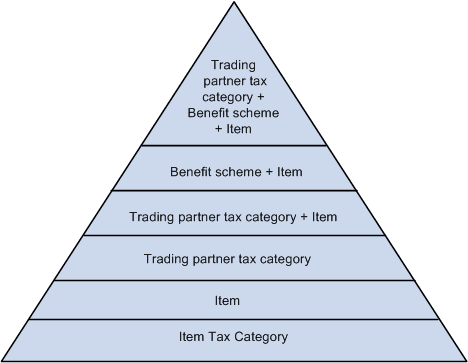
Each level in these diagrams represents a factor in the hierarchy that can provide a tax calculation code default value. At the top of the triangle is the most specific level from which the Tax Determination function can derive a tax calculation code for customs duty. At the base of the triangle is the least specific default level.
When determining the tax calculation code to use for a transaction, the tax routine first looks to the highest default level for a value. If it cannot find one there, it moves down the relevant levels in the triangle, searching for a defined value to use.
For example, if you have a purchase order for an excise-applicable item, the system looks at the transaction supplier and item and looks to the tax determination table to determine whether a tax calculation code is defined for the supplier's tax category and item. If not, it looks to determine whether a tax calculation code is assigned to the supplier's tax category and item's tax category. It continues through the hierarchy until it finds a tax determination line that applies to the transaction.
If the Tax Determination function cannot find a tax determination line at the least-specific level, the tax calculation code derivation process is unsuccessful and no tax calculation code appears by default on the Tax page for the transaction.
Related Topics