Component Demand Data Processing in Manufacturing Environments
This diagram illustrates how component demand data flows through the PeopleSoft Manufacturing tables from the SF_COMP_LIST table, creating a production picking plan, using the Review Plan page, and using the Material Release process:
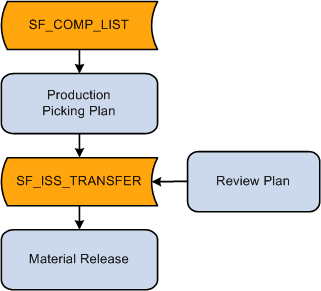
The component lists attached to production IDs and production schedules listed in the SF_COMP_LIST table include all component requirements. When you create a production picking plan for a production ID or production schedule, the system requests and reserves the required components in PeopleSoft Inventory. The system assigns item quantities in specific material storage locations to fulfill the picking plan's requested quantities. The system temporarily stores picking plan lines on the SF_ISS_TRANSFER table.
You use the Review Plan page to adjust picking quantities or locations, and the changes are recorded in the SF_ISS_TRANSFER table. When you confirm that a pick line on a pick batch ID has been picked, the Review Plan process updates the pick line record in the SF_ISS_TRANSFER table. The Review Plan process also updates the item quantity balances in the BU_ITEMS_INV (if the soft reservations option is selected), PHYSICAL_INV, and LOT_CONTROL_INV tables to reflect the quantity that has been reserved in the business unit's material storage locations.
Once the system indicates that a pick line has been picked on the Review Plan page, the Material Release process (SFS6001) updates the item quantity balances in the BU_ITEMS_INV table to reflect the quantity that has been issued to production (kit method) or moved to a WIP location (issue method). The system permanently maintains the pick line record in the TRANSACTION_INV table as fulfillment history data.
Quantities on the SF_ISS_TRANSFER Record
The SF_ISS_TRANSFER table tracks the portion of production's required quantity that was fulfilled using stock from a specific material storage location. When you generate a push or pull picking plan, the Production Picking Plan process (SFS6000) inserts demand line records in the SF_ISS_TRANSFER table. Pull picking plans do not record the picking location information in the table. When you specify picking line information for pull picking plans using the Review Plan page and save the page, the system inserts picking location records into the SF_ISS_TRANSFER table.
The SF_ISS_TRANSFER record includes two quantity fields:
| Field or Control | Description |
|---|---|
|
Quantity Picked (SF_ISS_TRANSFER_INV. qty_picked) |
Represents the portion of the quantity that has been assigned to a pick batch ID in the standard UOM. |
|
Quantity Picked Converted (SF_ISS_TRANSFER _INV.qty_picked_conv) |
Represents the quantity picked (qty_picked), converted to the stocking UOM. |