Inventory Tile
Use the Inventory tile (EP_IN_INVWORKCENTERNC_FL_GBL) to access a collection of frequently used Inventory-related components.
Navigation:
The Inventory tile is delivered as part of the home page, but the location can change if you change the delivered home pages or if administrators personalize their home pages.
This example illustrates the Inventory Tile.
Click the Inventory tile to access the Inventory navigation collections.
This example illustrates the Inventory WorkCenter.
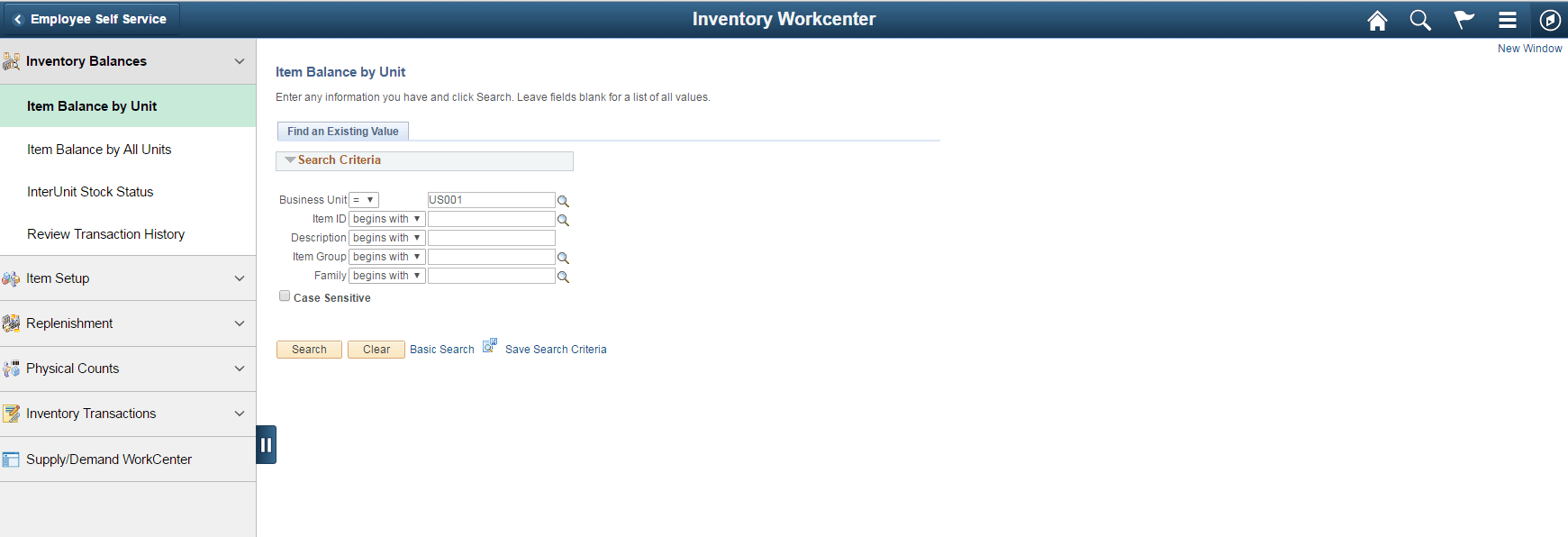
This navigation collection enables users to access frequently used Inventory components from one location. The left panel of this page lists the components collected under seven categories:
-
Inventory Balances
-
Item Setup
-
Replenishment
-
Physical Counts
-
Inventory Transactions
-
Supply /Demand WorkCenter
The right panel displays the component selected in the left panel.
Administrators can edit these categories by navigating to the Structure and Content page (Navigation: PeopleTools, Portal, Structure and Content, Portal Objects, Navigation Collections, Inventory).