Assumptions and Prerequisites
The following assumptions apply to this document:
-
Scope of this document is limited to the integration between CRM and FSCM (required synchronization between HRMS/FSCM and HRMS/CRM is not discussed).
-
Information in this document applies to both Releases 9.0 and 9.1, unless otherwise specified
-
Scope of this document is limited to the integration between CRM and FSCM (required synchronization between HRMS/FSCM and HRMS/CRM is not discussed).
-
Information in this document applies to both Releases 9.0 and 9.1, unless otherwise specified
The following prerequisite setup within CRM is required:
-
Enable the PeopleSoft CRM application for Asset Integration.
See Enabling PeopleSoft CRM for HelpDesk Integration with PeopleSoft IT Asset Management
-
Set up the Product Mapping table that associates combinations of Financials (FSCM) data (Asset Subtype, Manufacturer, and Model) with a Product ID that can be used for the CRM Installed Product entry if no Product ID is provided by FSCM. Product ID is a required field for CRM Installed Assets, but not for Financials assets.
See Setting Up CRM Application for Asset Integration.
-
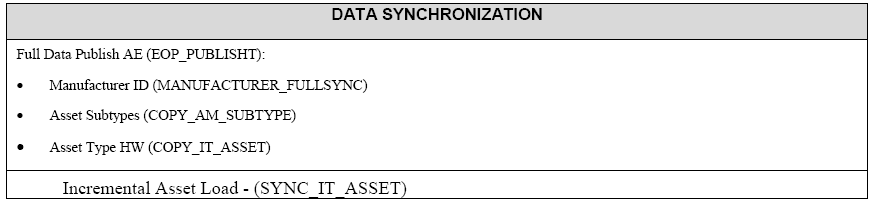
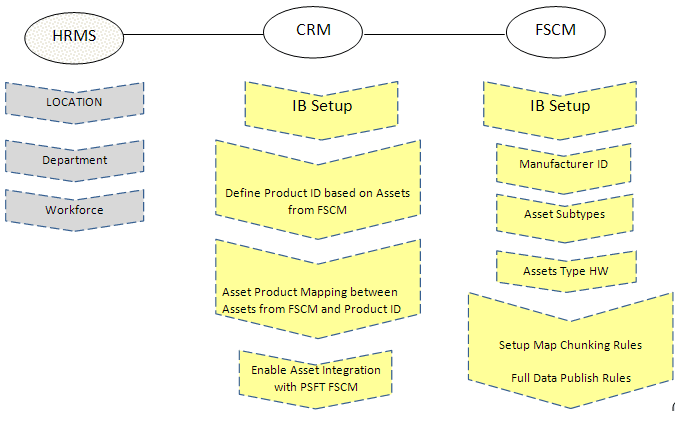
Synchronize additional data required for asset integration, including: Asset Subtype, Manufacturer, Location, Department, and Employee.
-
After synchronizing this data between the two systems, the actual initial one-time loading of asset data from Financials (FSCM) to CRM can be initiated using the COPY_IT_ASSET service operation.
-
Once these steps have been performed, the CRM system should have all asset data with an Asset Type of 010 (IT-Hardware) from the Financials system. At that point, the individual asset synchronization steps using the SYNC_IT_ASSET service operation can be performed.
The following diagram illustrates the required setup activities by application:
Following are the data synchronization services that are provided: