Architecture
The work order approval workflow uses the workflow framework provided by PeopleSoft Enterprise Components, rather than the standard PeopleTools workflow, which requires advanced technical skills in PeopleTools. Consequently, the PeopleSoft Maintenance Management workflow is easy to create and maintain. All the steps in the work order approval workflow are defined using PeopleSoft pages and are designed so that functional users can easily set it up.
PeopleSoft Maintenance Management delivers the work order approval workflow engine preconfigured. Oracle recommends using the delivered configuration as is, making minor modifications to suit your particular business practices. The work order approval is delivered as system data, using the WM_WORK_ORDER approval process ID. You can modify the definition to suit your implementation by defining your own phases, steps, and criteria. These definitions control who should approve the work order, the order in which they approve it, and the method by which the system routes it to approvers. The approval process is keyed by SetID, and by using SetID sharing, each business unit can either have its own independent work order approval process configuration or share the same approval process configuration with other business units. Oracle recommends that you understand the workflow technology before making any changes.
See documentation PeopleSoft Approval Framework
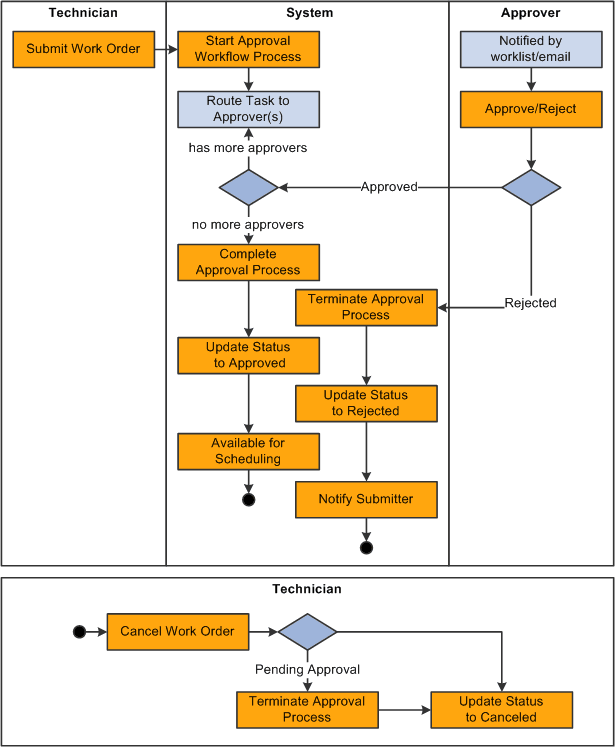
Work orders are routed to approvers so that they can act on the work orders to approve or deny them. If the approver approves a work order, then it is routed to the next approver, if any. A submitter or approver can add ad hoc approvers for the current work order as well. After the work order is fully approved (or no approval is required), it is available for a scheduler to schedule technicians to perform the work. If the approver denies a work order, than the approval process is terminated. The submitter is notified of the denial and can optionally revise the work order and resubmit it. The technician can choose to cancel a work order; and if an approval process is in progress, it will be terminated.
The following elements are used in the work order approval process definition and are among the items you would modify to suit your business requirements:
-
Stages.
A stage is one part of an approval process that can contain multiple parallel paths. The system executes stages in sequence where one must complete before the next one begins. A stage consists of one or more paths.
-
Paths
A path contains a sequence of steps. Within a stage, paths execute in parallel. Path entry criteria determine whether a path executes for a given work order.
-
Steps
A step represents one or more approvers or reviewers. Steps within a path execute in sequence. Separate criteria for each step determine whether or not that step executes. Each step can also have a set of reviewers, who are notified about transactions pending approval by email, if configured, and through the Worklist. But the workflow proceeds without waiting for reviewers to act.
Note:
While the approval process configuration may require any number of approvers to approve a step before it advances, any single approver can deny a work order. After a work order is denied, the system stops routing the work order, the approval process terminates, and the entire work order is denied.
The system notifies approvers of a pending approval by using Worklist and email. You need to define the individuals or roles that comprise a user list, and the authorized approvers. You can specify approvers by roles, queries, fixed lists, or by using custom application classes. Once the required number of approvers have approved a step, the approval workflow advances past that step.
The following diagram illustrates the overall process flow for the work order approval workflow process. Workflow Approval is selected for the work order business unit. A work order is created in PeopleSoft Maintenance Management and the Approval Status is Initial. You enter the work order header data and work order task requirements and save the page to start the Approval Workflow Process. The approvers are notified by email that the task needs approving. If the task is approved, the Approval Status in the work order changes to Approved.
This diagram illustrates the overall process flow for the work order approval workflow process.