Bills of Material
PeopleSoft Manufacturing provides features such as revision control, component yield, alternate BOMs, multiple outputs, and operation overlap to maintain complex BOMs, resources, work centers, tasks, and routings dynamically. You can use PeopleSoft Workflow to automate approvals and controls between PeopleSoft Engineering and PeopleSoft Manufacturing. In addition, multimedia attachments, such as detailed work documents, drawings, and videos clarify and expand instructions for complex operations.
If you have PeopleSoft Engineering installed, you can integrate between PeopleSoft Manufacturing and PeopleSoft Engineering to maintain engineering change orders (ECOs), BOMs, and routings—both manufacturing and engineering versions—and document management. You can even make mass BOM changes.
You can make changes to BOMs and routings within PeopleSoft Engineering, and then release those changes to PeopleSoft Manufacturing under ECO control. You can also take advantage of a complete document management solution that enables you to manage and approve document changes within PeopleSoft Engineering and then deploy them within PeopleSoft Manufacturing.
You also have the option to define planning BOMs.
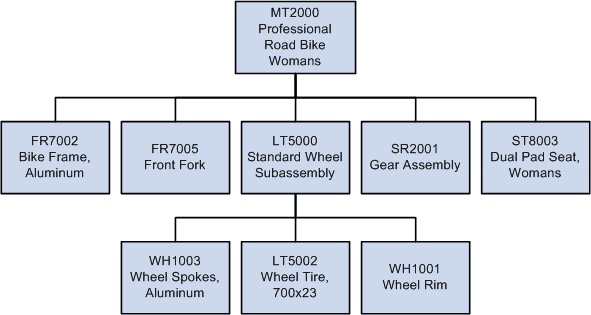
Example: BOM Structure
BOMs are design structures that you can use to define how to assemble or produce your end items or products. In a tree-like structure, BOMs list all the assemblies, intermediate items, and raw materials that go into a parent assembly, displaying the quantity of each that is required to make an assembly or end item.
This diagram illustrates a BOM for a road bike, showing the components of bike frame, front fork, gear assembly, seat, and standard wheel. The standard wheel is a subassembly consisting of wheel spokes, tire, and rim:
PeopleSoft Manufacturing enables you to maintain all your complex product structures. You can also alter BOMs, create alternate BOMs, gather where-used data, display indented inquiries, designate multiple outputs, make mass BOM changes, and phase out one item while adding another.
By creating alternate BOMs, PeopleSoft Manufacturing enables you to prototype and assign components to different operations using different BOMs. In addition, this gives you the ability to run multiple configurations without using PeopleSoft Product Configurator.
The multiple outputs functionality enables you to define co-products, recycle and waste by-products on the BOM. An example of this could be the orange juice process, which can have orange juice and orange concentrate as primary and co-products, respectively, and orange pulp and orange pits as recycle and waste by-products.
In addition to using basic, required BOM functionality, you can associate engineering drawings, text, documents, or multimedia representations to a BOM at the assembly or component level.
Within PeopleSoft Manufacturing, there are three types of BOMs:
-
Manufacturing BOMs (MBOMs)
-
Engineering BOMs (EBOMs)
-
Planning BOMs