Understanding Inventory Stock Counts Using Mobile Devices
Counting inventory stock within a location is a common use for mobile devices. Inventory stock is item stock that is currently recorded in a PeopleSoft Inventory business unit. Counting items can involve counting an entire business unit (such as a warehouse) or a section of a business unit (such as a stockroom on a hospital floor).
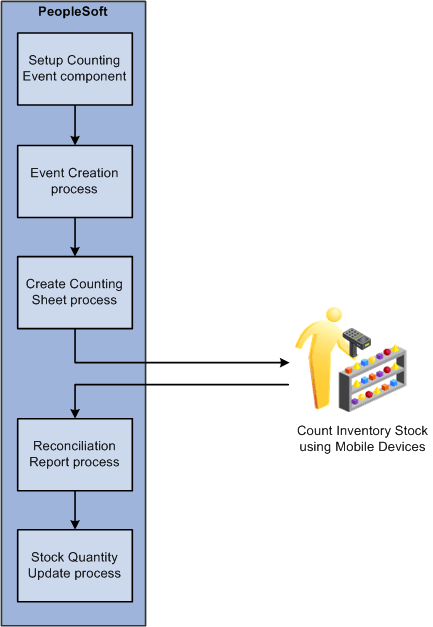
After the stock count quantities are recorded, PeopleSoft Inventory can produce a reconciliation report showing the differences between the counted item quantities and the item quantities currently recorded in the inventory business unit. After you have analyzed your count results, you can recount items as needed. When an inventory count is complete, you can run the Stock Quantity Update process in PeopleSoft Inventory to adjust your item quantities within the business unit to match your count results.
To count inventory stock, you must start in PeopleSoft Inventory by defining and creating a counting event. A counting event is a selection of items to be counted based on your criteria. A counting event is identified by a counting event ID.
Using the PeopleSoft Inventory, you can perform two different types of counting events:
-
A physical inventory count performs a stock count of the entire PeopleSoft Inventory business unit. You must prohibit material movement for the business unit before performing this type of count.
-
A cycle count performs a stock count on a portion of the PeopleSoft Inventory business unit. Cycle counts can be created to count selected material storage locations, items, item families, and other options.
When counting inventory stock you have a number of options, including:
-
Using blind counts. A blind count does not display the current quantity of the item within the location. A blind count forces the user to count each item quantity rather than assume the displayed quantity is correct. In contrast, a non-blind count displays the expected item quantity and the user only needs to override it for discrepancies discovered during the counting process.
-
Not displaying zero-quantity items. Eliminating zero-quantity records from the count excludes material storage locations identified by the system as empty.
-
Breaking up a count into groups. Counting groups enable multiple users to count different locations or items within the same counting event. One counting event can be broken up into multiple counting groups.
The following diagram illustrates the inventory stock counting process when using mobile devices and PeopleSoft Mobile Inventory Management:
Using Mobile Inventory Management, you can count inventory using four types of mobile counts. These counts include:
-
Guided count
-
Count by location
-
Count by item
-
Manual count
These counts are described in the next sections.