Direct Shipping Products
In addition to shipping products from your own warehouses, you can ship them to customers directly from another supplier (that is, use direct ship from supplier.) You must have PeopleSoft Purchasing installed to use the direct ship from supplier feature in PeopleSoft Order Management.
If a product is always shipped directly to your customer, select the Direct Ship from Supplier option when you define the product on the Product Definition - Options2 page. Some products might typically ship out of your own warehouses, but in special circumstances, you may want them shipped directly from the supplier. In those cases, you can select the Direct Ship option on the Ship Options tab on the Order Line region of the Order Entry Form page and the Shipment Schedules page.
When the order is saved, the system flags the demand to be directly shipped from the supplier to the customer. Purchasing picks up this demand in the Requisition Loader Process and creates a new requisition. If you want it to be shipped to your warehouse, you can use the Alternate Sources of Supply page to choose additional options or use the Pegging Workbench. Alternate Sourcing and Pegging require additional setup.
Note:
You can also create a "direct ship from supplier" purchase order from the sales order using alternate sources of supply. The purchase order is created and saved when the sales order is saved.
See .Understanding Alternate Sources of Supply
See .PeopleSoft Supply Chain Management Common Information: Understanding Pegging
Direct Ship Process Flow
The following diagram illustrates the shipping process flow that occurs for schedules that are shipped directly from the supplier to the customer:
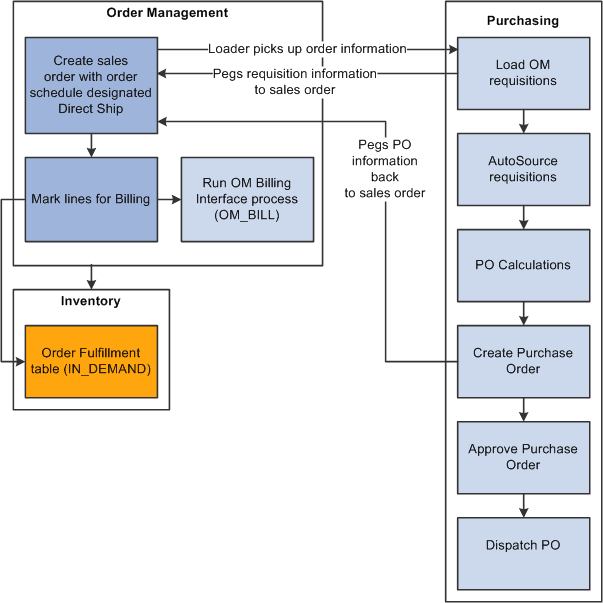
Direct shipping process
The steps describe the processing:
-
The Requisition Loader process in PeopleSoft Purchasing searches order schedules and ensures that the Direct Ship from Supplier option is set to Yes and that the order schedule (ORD_SCH_STATUS) is in Open status.
The process picks up the order schedules without holds that affect purchasing (PO_HOLD_FLAG=No), where the direct ship from supplier status (PO_DISTRIB_STATUS) is Active. The system creates requisitions, and, if the special handling flag (SPEC_HANDLE_CODE) on the order schedule is selected, it uses the shipping method code (SHIP_TYPE_ID) and carrier ID (CARRIER_ID) on the order schedule for the requisition schedule. This information is passed to the purchase order. If the product is configured, the Requisition Loader process also picks up the configuration code and template ID. When the Requisition Loader process picks up a direct shipped schedule, the system changes the direct ship from supplier status to Processed.
Requisition Loader creates pegging detail in the pegging tables to peg the requisition to the sales order schedule.
-
The AutoSelect process loads the information into the staging tables.
-
The PO Calculations process picks up the information from the staging tables, calculates the prices, and selects the suppliers.
-
The Create Purchase Orders process creates the purchase order and updates the Order Schedule record with the purchase order number. The Create Purchase Order process creates pegging detail to peg the purchase order to the sales order schedule.
The instructions to the suppliers on the purchase order are to direct ship the product to the customer indicated on the schedule.
-
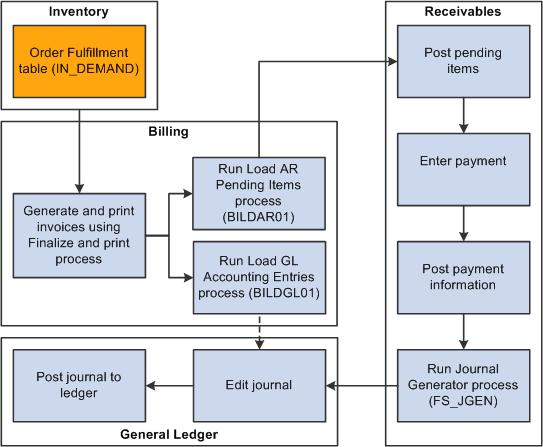
The system inserts a pending line into the IN_DEMAND table for each direct ship from supplier order schedule when the schedule is saved. When the schedule is marked for billing the demand status is set to depleted.
Run the Mark Lines for Billing process (OMMARKLN) or manually record shipment lines for non-stock and direct ship from supplier schedules using the Mark Lines for Billing page.
To automatically record a depleted line for each non-stock order schedule when you save it with a status of Open, select the Mark for Billing at Order Save option on the PeopleSoft Order Management business unit Order Entry Features page.
When you run the Mark Lines for Billing process, you can mark order schedules for billing if a purchase order schedule is matched to a voucher in PeopleSoft Payables. The system inserts the line for direct ship from supplier schedules based on a purchase order schedule level match of the voucher in PeopleSoft Payables and PeopleSoft Purchasing. If the schedule has a value of M (fully matched), the system inserts a shipped line.
Note:
If you run the Mark Lines for Billing process, you must select the Mark Direct Ship If Matched option on the Mark Lines for Billing Process page; otherwise, the process marks all direct ship schedules for billing, regardless of whether the voucher is matched.
-
You can run the Journal Generator process for these transactions from either PeopleSoft Billing or PeopleSoft Receivables.
Holds on Direct Shipped Schedules
You can set up hold processing for a number of sales order conditions on the PeopleSoft Order Management business Hold Processing page. With the Pass to Purchasing option, you determine whether the hold conditions prevent processing of direct ship from supplier orders and new purchase orders created from alternate sourcing in PeopleSoft Purchasing. You can also make this choice for holds that you apply manually or for messages that include holds.
If a direct ship from supplier order schedule is on hold and you have elected to prevent processing in PeopleSoft Purchasing for the hold condition, the Requisition Loader process does not pick it up. If you elected to create a new purchase order from alternate sources and the schedule is on hold, the PO is not created. If you selected the Pass to Purchasing option, the system sets the hold status for purchasing (PO_HOLD_FLAG) to No. In this case, orders are processed in PeopleSoft Purchasing even if the order line or schedule is on hold.
If there is a hold on a direct ship from supplier schedule that applies to processing in PeopleSoft Purchasing and the hold is removed, the system changes the purchasing hold status to No and the Requisition Loader process picks it up. If you chose to create a new purchase order from alternate sources, the PO is created when the hold is removed online and the order is saved.
If you put a direct shipped order schedule on hold after the Requisition Loader process has picked up the schedule, the system changes the direct ship status to Modified. Depending on the processing status within PeopleSoft Purchasing, this occurs:
-
When the requisition has been created, the requisition line is canceled.
-
When the purchase order has been created or dispatched, the requisition line is canceled and the quantity on the purchase order is decreased by the original requisition quantity.
If this decreases the purchase order quantity to zero, the purchase order line is canceled.
-
If the purchase order has been closed, no changes are made.
When the hold is removed, the Requisition Loader process picks up the direct ship from supplier schedule and creates a new requisition.
Changes to Direct Ship from Supplier Schedules
When the Requisition Loader process in PeopleSoft Purchasing picks up direct ship from supplier schedules, it changes the direct ship status of the schedule to Processed. With this status, additional Requisition Loader process runs ignore the schedule.
In addition to holds, PeopleSoft Order Management sets the direct ship status to Modified when you change any of the fields for direct shipped schedules:
-
Product ID.
-
Quantity.
-
Unit of measure.
-
Requested shipment date and time.
-
Requested arrival date and time.
-
Schedule status (Cancel).
In addition, if you selected the special handling option (SPEC_HANDLE_CODE), any changes in the carrier ID (CARRIER_ID) or shipping method (SHIP_TYPE_ID) change the direct ship status to Modified.
The Drop Shipments Update process on the Requisition menu in PeopleSoft Purchasing picks up modified schedules and updates the requisitions. If the requisition has been sourced to a purchase order or orders, each changed field generates a change request for each affected purchase order.
If you cancel the sales order schedule, the corresponding requisition schedule is canceled if the schedule has not already shipped. If purchase orders have been created, the purchase order schedule is also canceled. If you have selected the Mark Lines for Billing at Order Save option on the Order Entry Features page or manually run the Mark Lines for Billing process, you cannot cancel the schedule, because the system considers the order already shipped for billing purposes.
Note:
If the purchase order has already been created for the requisition, changes made on the sales order will take effect immediately on the purchase order using the alternate sourcing order change functionality. Only the purchase order will be updated with the changes.