How Pricing Occurs on the Sales Order
Here is an example of how pricing is determined on a sales order in PeopleSoft Order Management.
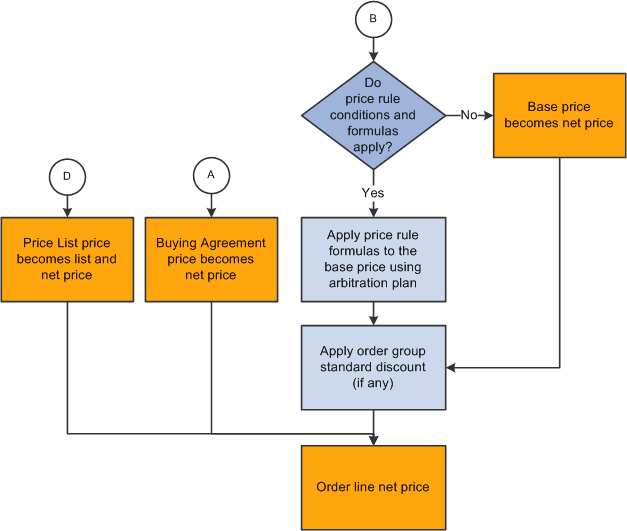
During sales order entry, the arbitration ID is supplied by default to the sales order or buying agreement from the sold-to customer, the pricing customer group associated with the sold-to customer, or the arbitration plan marked as the default for the transaction being priced. The PeopleSoft Enterprise Pricer is called when the Customer Service Representative (CSR) creates or modifies a sales order or quote.
The list price is retrieved based on the price list lookup option defined for the sales order transaction in PeopleSoft Enterprise Pricer:
-
Price lists associated with price list fields are defined for the pricing transaction. The system selects the first active list price in the defined priority order if lookup in priority order is defined for the transaction.
-
The system selects the best (lowest) price for price lists associated with price list fields if consider all prices is defined for the transaction.
-
The system selects the base price established for the product if it finds no price defined in the price lists. This is always the default.
Note:
The PeopleSoft Order Management transactions (sales order, quote, RMA and buying agreement) are delivered with the list price lookup option consider all prices.
PeopleSoft Enterprise Pricer then retrieves any price rule conditions that match the transaction and applies the price formulas to the base price. The applicable price rules and formulas are applied in the order as defined by the arbitration plan. The pricing engine returns an audit list of the price rules and adjustments that are applied to the transaction at pricing time. These price adjustment audits are saved with the order line or schedule.
You can optionally enter an arbitration plan ID as the exclusive pricing ID when a buying agreement line is created. The system calls PeopleSoft Enterprise Pricer if an arbitration plan is entered. The net unit price returned from the pricing engine is used as the net price on the buying agreement line. When the sales order or quote is priced with a buying agreement line assigned to it, the price comes directly from the buying agreement line.
Note:
When you enable the Allow Adjustments to Buying Agreement Price option, you can change the price on the sales order even if it is a buying agreement price.
The Applicable to Buying Agreement option on the Formulas page enables you to create price rules that specifically apply to buying agreement prices.
The Price and Availability component enables you to price a transaction without actually creating the sales order or quote. You can enter the same information as on the sales order or quote. You can select a base price from the Inventory business unit base price or let the system automatically select a base (list) price from the price lists. The system then applies all price rule formula adjustments. PeopleSoft Enterprise Pricer returns an audit list of the price rules and formulas that are applied at pricing time, as in sales order processing.
Batch pricing for the sales order or quote works the same way as the online pricing of the sales order or quote. Depending on how you have set up your installation options for online pricing, pricing during order entry will occur in the background or when you save or select the price order button from the order entry or the shipment schedules page.
Note:
The entire sales order or quote is priced every time a line or schedule is priced. This means new adjustments that may apply to previously entered lines will occur with every change or newly entered line.
The following diagrams illustrate how pricing occurs on the sales order.
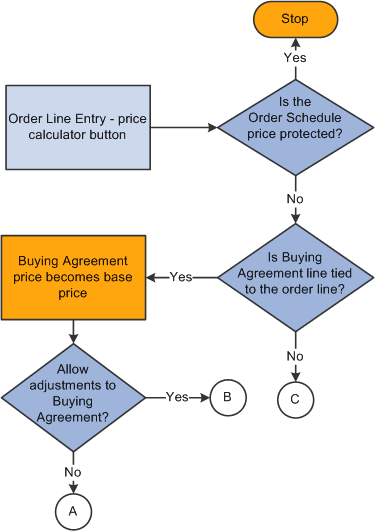
Flow chart —Pricing the sales
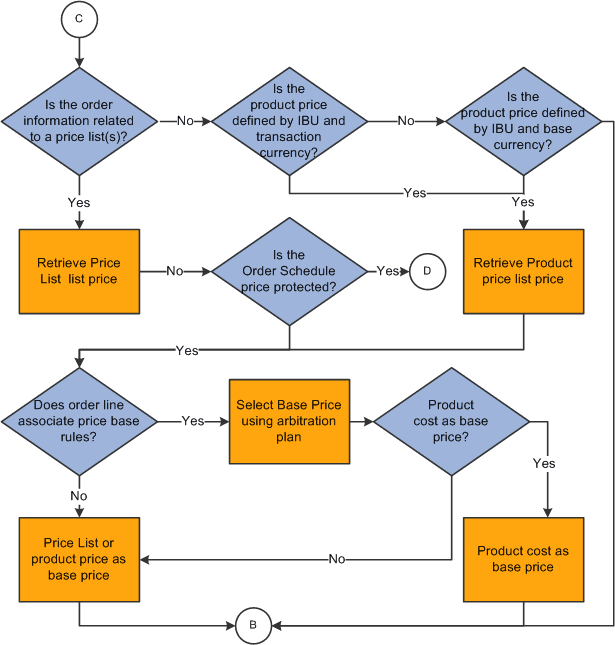
Flow chart — Pricing the sales order