Understanding Counter Sales
This section discusses:
-
Counter sales orders fulfillment in PeopleSoft Inventory.
-
PeopleSoft Billing population for counter sales orders.
-
Counter sale business process flow.
-
Back orders and overriding inventory in the counter sale environment.
-
Payments in the counter sale environment.
-
Deposit refund.
Counter sales enable you to take an order over the counter and interact directly with the customer. Customers can pick out items and bring them to the counter, or they can order items that are available behind the counter or at a pick up or will call area. At the counter, a clerk rings up the order, accepts payment, issues a receipt, and prints a picking list if some of the items are to be picked elsewhere. The transaction can be completed in a couple of minutes.
You can enter the customer details in these ways:
-
Through an existing customer already in the system.
-
Creating a new customer using the Quick Customer Create.
-
Creating a new customer using the short-term customer functionality.
-
Creating a new customer using a template customer, such as a cash only customer.
The ship from Inventory business unit entered upon entering the sales order is required when adding a counter sale order. It determines which order lines can be picked up and paid for during the session and it controls other processing requirements for picking item and allocation.
Customers can pay with cash, check, credit card, debit card, procurement card, corporate voucher, or add the order to their account. If some of the items are not available for immediate pick up, a deposit may be required to place the order. When an order is paid in full or partially paid, an invoice number is preassigned in PeopleSoft Order Management and will be passed to the target invoice functionality in PeopleSoft Billing.
For value-added tax (VAT), the schedules are grouped by VAT code, and the tax is calculated and prorated to the schedules.
See .Understanding How VAT is Used with Sales Orders
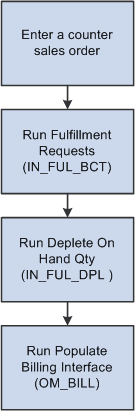
The following figure shows a high level view of the counter sale process flow: