Ship To Customers
You can enter or review processing options for customers who receive delivery of goods or services. For ship to customers, you can:
-
Define shipping options and container label formats.
-
Define just-in-time parameters and demand fulfillment options.
-
Associate multiple indirect customers to a single ship to customer.
-
Assign multiple carrier accounts to a single ship to customer.
-
Define exception delivery dates for the ship to customer.
-
Associate multiple ship to customers with a single sold to customer.
-
Associate a single ship to customer with multiple sold to customers.
Note:
The Ship To customer role and Ship To address are called Worksite customer role and Worksite customer address when Staffing Front Office or Pay/Bill Management are being used based on installation options.
Set up ship to customers to reflect the processing options that you want to apply to each ship to customer and each ship to location address.
The Sold To and Ship To Customer Relationship
To apply the correct processing criteria to sold to and ship to customers, you must correctly assign either separate customer IDs or location addresses to customers.
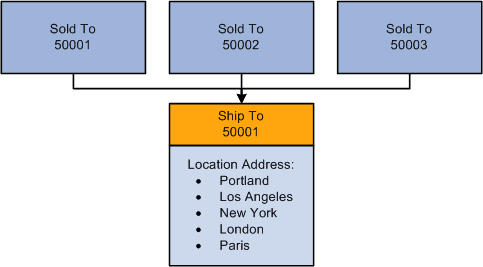
The following diagram illustrates that all of the ship to addresses (location addresses) for ship to customer 50001 have the same processing options; only the addresses vary. A single ship to customer is associated with multiple sold to customers.
One processing option for multiple ship to addresses
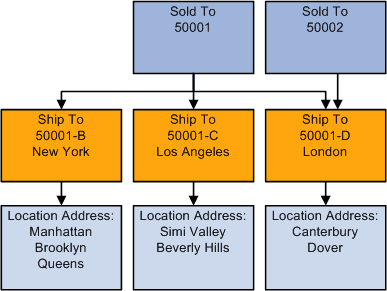
To establish different processing criteria for each address for the ship to customer, assign the addresses to different customer IDs. The following diagram illustrates that each ID can have multiple location addresses that share the same processing options.
Process Flow — Multiple processing options for multiple ship to addresses and location