Draft Approval Page
Use the Draft Approval page (PYMNT_MAN_APPR) to approve unposted draft payments manually.
Navigation:
The draft payments must be created but not posted before you can access this page.
When the Pay Cycle process runs without the Preapprove option selected on the Draft Options page of the Payment Selection Criteria component, the draft payment is created with a status of Created. If you selected the Preapprove option, draft payments are created with a status of Approved.
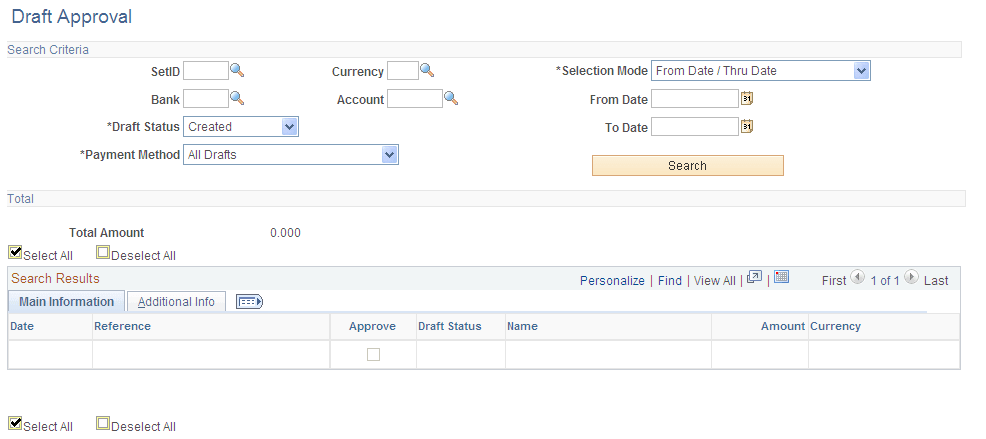
This example illustrates the fields and controls on the Draft Approval page. You can find definitions for the fields and controls later on this page.
| Field or Control | Description |
|---|---|
|
SetID |
Enter to search by bank SetID. This field is required. |
|
Selection Mode |
Select an option to search by either of the following criteria: From Date/Thru Date: Searches by payment date range. From Ref/To Ref (from reference/to reference): Searches by a reference number range for drafts. |
|
From Date |
Enter the beginning date or reference number. |
|
To Date |
Enter the ending date or reference number. |
|
Bank |
Enter to search by bank code. This field is required. |
|
Payment Method |
Search by payment method for the voucher. Select from ALL, Cust Draft (customer draft), EFT Draft (electronic funds transfer draft), or Vndr Draft (supplier draft). |
|
Account |
Enter to search by bank account. This field is required. |
|
Draft Status |
Search by current draft status. Drafts with the Approved or Created draft status can be posted when the Payment Posting process runs. |
Total
| Field or Control | Description |
|---|---|
|
Total Amount |
Displays the total amount for the draft payments that meet the search criteria. |
Main Information
Select the Main Information tab in the Search Results scroll area.
| Field or Control | Description |
|---|---|
|
Date |
Displays the draft payment date. |
|
Reference |
Displays the draft reference number. |
|
Approve |
Select the payment for approval. When you click the Save button, the system changes the draft payments status to Approved. |
|
Amount |
Displays the amount and currency of the draft payment. |
Additional Info
Select the Additional Info tab in the Search Results scroll area.
| Field or Control | Description |
|---|---|
|
Pay Status |
Displays the payment status of the draft: Alignment: The payment is used for alignment purposes. Paid: The payment was made. Pre-Note: The data is a bank prenote. You typically use prenotes when setting up electronic banking. Overflow: The payment printed on an overflow advice. Replaced: The payment was replaced. For example, when a check is reprinted with a new check number, the check number is given the status of Replaced. Stopped: The payment was reversed. Use the Payment Cancellation page to stop a canceled payment. Undo: The canceled payment was undone. Use the Payment Cancellation page to undo a canceled payment. Void: The payment is void. Use the Payment Cancellation page to void a canceled payment. Deleted: The payment was deleted. |
Related Topics