Manual Draft Cancellation Page
Use the Manual Draft Cancellation page (APD_MANDFT_CANCE) to cancel a manual draft after it has been created.
Navigation:
This example illustrates the fields and controls on the Manual Draft Cancellation page. You can find definitions for the fields and controls later on this page.
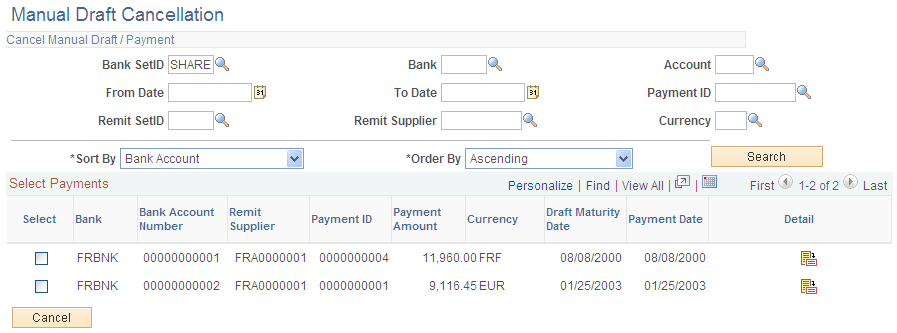
Cancel Manual Draft/Payment
| Field or Control | Description |
|---|---|
|
Account |
Specify the bank account. |
|
From Date and To Date |
Enter the first and last dates of the range in these fields to search by payment date. |
|
Sort By |
Select the value by which you want to sort the search results. You can sort results by bank, currency, maturity date, paid amount, payment ID, settlement date, and supplier. |
|
Order By |
Select whether to order the results in ascending or descending order. |
Select Payments
| Field or Control | Description |
|---|---|
|
Select |
Select the check box for a draft payment to mark it for cancellation. |
|
Bank Account Number |
Displays the bank account that receives the payment. |
|
IBAN |
Displays the international bank account number (IBAN) in addition to the local, domestic bank account number when the country has been set up to display the IBAN on the IBAN Formats page |
|
Payment Date |
Displays the that date the payment is to be paid or settled. |
|
|
Click to view a list of the vouchers that are applied to the draft. |
|
Cancel |
Click to cancel the selected draft payments after selecting check boxes next to the draft payments. |
