PeopleSoft Payables G-Invoicing Business Processes
PeopleSoft provides integration that supports the G-Invoicing Requesting Agency intragovernmental Procure-to-Pay business process. The G-Invoicing Procure-to-Pay process includes several APIs and processes in PeopleSoft as well as some manual steps.
G-Invoicing Procure-to-Pay Process
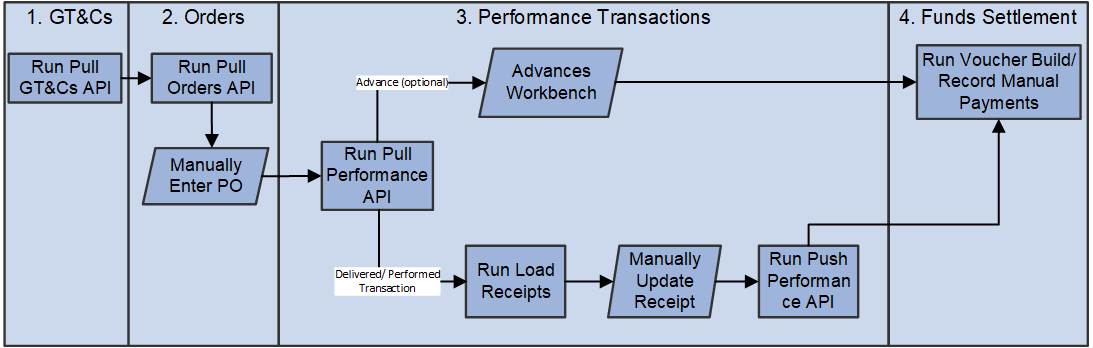
| Stage | G-Invoicing Steps | PeopleSoft Steps |
|---|---|---|
|
1. GT&Cs |
GT&Cs are entered directly into G-Invoicing. |
Refer to PeopleSoft Purchasing: Understanding U.S. Federal G-Invoicing Processing for more information. |
|
2. Orders |
Orders are entered manually into G-Invoicing. |
Refer to PeopleSoft Purchasing: Understanding U.S. Federal G-Invoicing Processing for more information. |
|
3. Performance Transactions |
Performance transactions are pulled into PeopleSoft or pushed into G-Invoicing using the Performance API. |
|
|
4. 7600EZ |
Select 7600EZ as Business Application on the Header Details. |
All new G-Invoicing APIs will employ a push/pull model utilizing REST services. Vouchers are entered into PeopleSoft with a reference EZ number. EZ Invoices can be rejected by entering a Reversal Voucher. |
|
Advance payments (‘548’) |
Entered into G-Invoicing by the seller. |
Advances are loaded to the Advances workbench for updating using the Pull Performance API. Advances can be built into prepaid vouchers using Voucher Build. |
|
Adjustments to advances (negative ‘548’) |
Entered into G-Invoicing by the seller. |
Advance adjustments can be built into journal vouchers using Voucher Build. |
|
Delivered/performed transactions (‘035’) |
Entered into G-Invoicing by the seller. |
Delivered/Performance transactions are loaded as Advanced Shipping Notices (ASNs) in Purchasing using the Pull Performance API. ASNs can be built into Receipts by Load Receipts and leverage ERS for Payables to create vouchers. |
|
Received/accepted transactions (‘050’) |
Received from PeopleSoft using API. |
Refer to PeopleSoft Purchasing: Understanding U.S. Federal G-Invoicing Processing for more information. |
|
Adjustments to received/accepted transactions (negative ‘050’) |
Received from PeopleSoft using API. |
Refer to PeopleSoft Purchasing: Understanding U.S. Federal G-Invoicing Processing for more information. |
|
Adjustments to delivered/performed transactions (negative ‘035’) |
Entered into G-Invoicing by the seller. |
Adjustments are received through the Pull Performance API. These transactions must be reviewed and handled manually in PeopleSoft. |
|
Deferred payment transactions (‘014’) |
Entered into G-Invoicing by the seller to communicate the amount/percentage of work completed for work in progress transactions. |
Deferred payment transactions are received through Pull Performance API. They are stored for informational purpose only. |
|
7600EZ Seller Invoice transactions (011) |
Entered into G-Invoicing by the seller to communicate invoice amount. |
Invoices are received through 7600EZ Pull API and referenced on Vouchers. |
|
7600EZ Seller Invoice Reversed (324) |
Entered into G-Invoicing by the seller to communicate invoice has been completely reversed. |
Reversed invoice transactions are received through 7600EZ Pull API and referenced on Reversal Vouchers to liquidate the original voucher. |
|
7600EZ Buyer Invoice Rejection (598) |
Invoice rejections are initiated by the Buyer in PeopleSoft and pushed to G-Invoicing using the 7600 Push API. |
These transactions are initiated by the Buyer by creating Reversal Voucher and reference the original voucher. This will be available for 7600EZ Push process to notify the Seller. |
|
4. Funds Settlement |
G-Invoicing initiates funds transfers using IPAC. |
The PeopleSoft G-Invoicing Budget Checking process runs budget checking, matching, and document tolerance as well as creates manual payments for G-Invoicing PeopleSoft vouchers. |
Refer to PeopleSoft Purchasing: Understanding U.S. Federal G-Invoicing Processing for information on enabling G-Invoicing integration and configuring G-Invoicing definition.