Posting Setup Validation Page
Use the Posting Setup Validation page (AP_VAL_INHRIT_RQST) to run the Validate Posting Setup Application Engine process (AP_VALCFINH) to verify that you have set up inheritance correctly and completely for PeopleSoft Payables.
Navigation:
Use this page to run the Validate Posting Setup Application Engine process (AP_VALCFINH), which verifies that you have set up your ChartField inheritance correctly. This process finds any set up issues that might cause problems for the PeopleSoft Payables Voucher and Payment Posting processes and posts them to the Process Message Log. Potential issues include:
-
Any SetID/AP inheritance group combinations in which ChartField inheritance has not been defined.
-
Any bank ChartField inheritance that has not been defined for banks with PeopleSoft Payables setup.
-
Any SetID/AP inheritance group that has been defined but has an invalid option.
-
Any procurement accounting controls for business units with invalid allocations.
To view the error messages:
-
Click the Process Monitor link on the Posting Setup Validation page.
-
Click the Details link on the Process List page.
-
Click the Message Log link on the Process Details page.
-
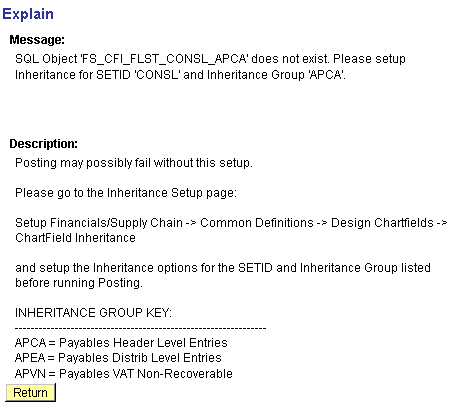
Click the Explain button on the Message Log page.
This diagram shows the posting setup issues on the Explain page (PMN_MSG_EXPLAIN).