Report Control Information - Payor Data Page
Use the Report Control Information - Payor Data page ( WTHD_CONTROL) to identify payor information.
Navigation:
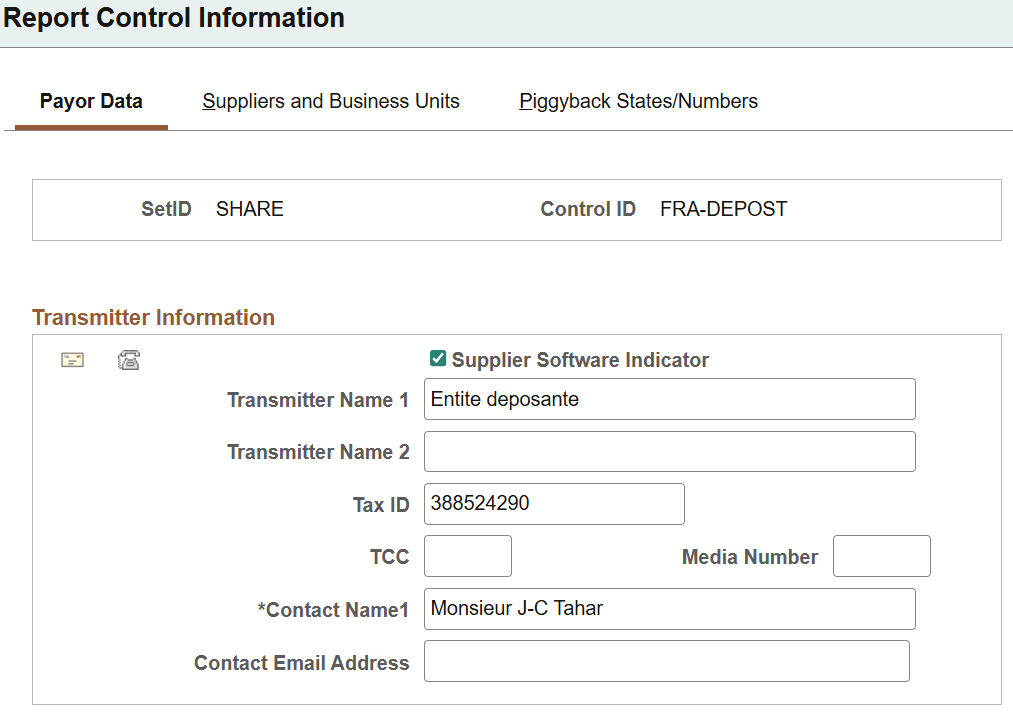
This example illustrates the fields and controls on the Report Control Information - Payor Data page (1 of 2). You can find definitions for the fields and controls later on this page.
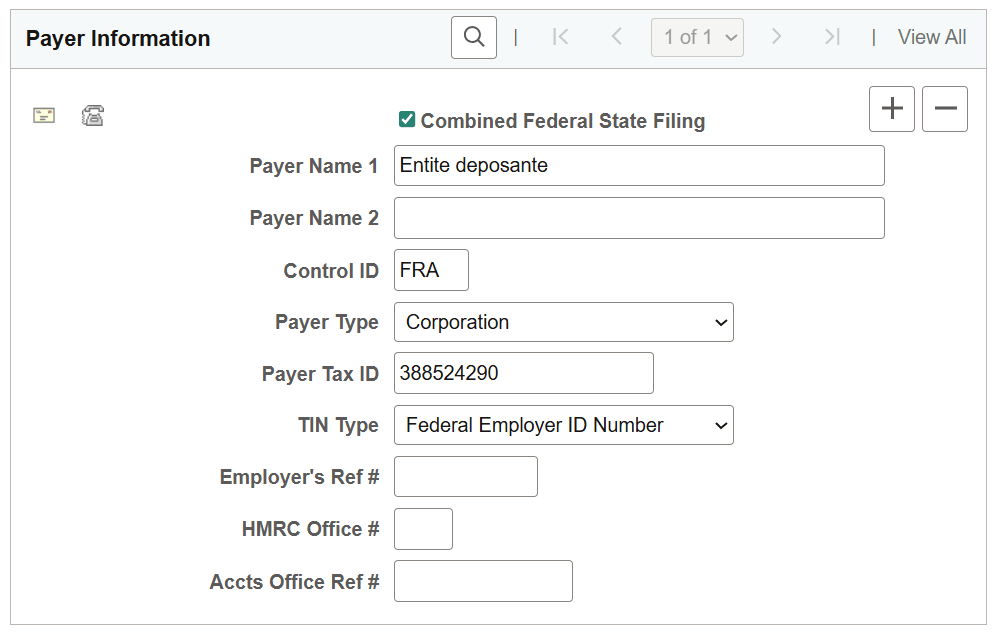
This example illustrates the fields and controls on the Report Control Information - Payor Data page (2 of 2). You can find definitions for the fields and controls later on this page.
Note:
Withholding control information is keyed by SetID and control ID. This enables you to define several control information IDs to run different withholding reports. You may wish to run separate reports based on business units, suppliers, or payors. Typically, you have one control ID set up for each government reporting entity.
Transmitter Information
| Field or Control | Description |
|---|---|
|
|
Click to access the Transmitter Address page, where you can enter the transmitter's address data, formatted as required by your tax authority. |
|
|
Click to access the Transmitter Phone page, where you can enter the transmitter's telephone, fax information, and contact information. |
|
Supplier Software Indicator |
Selected by default indicating that the electronic file was generated via outside supplier software. Deselect this check box if you have customized this process. |
|
Transmitter Name 1 and Transmitter Name 2 |
Use to enter the transmitter's name. |
|
Tax ID |
Enter your tax ID for this transmitter. |
|
Transmitter Cntl Code (transmitter control code) |
If applicable, enter your transmitter control code. |
|
Media Number |
If applicable, enter your media number. |
|
Contact Name 1 and Contact Email Address |
Enter the name of a contact person for this transmitter and email address, as applicable |


Payer Information
| Field or Control | Description |
|---|---|
|
|
Click to access the Payer Address page on which you can enter the payer address data, formatted as required by your tax authority. |
|
|
Click to access the Payer Phone page on which you can enter the payer's telephone and fax information. |
|
Combined Federal State Filing Participant |
(USA) Select this flag if the payer is participating in the Combined Federal State Filing program. |
|
Payer Name 1 and Payer Name 2 |
Enter the payer's name. |
|
Control ID |
Enter a control ID. This could be a business unit. |
|
Payer Type |
Select the payer type. The available options are: Blank, Corporation and Individual. The default value for Payer Type is Corporation. |
|
Payer Tax ID |
Enter your tax ID for this payer. |
|
TIN Type |
Select the TIN type. The available options are: Blank, Federal Employer ID Number and Social Security Number. The default value for TIN Type is Federal Employer ID Number. |
|
Employer's Ref #(employer's reference number) |
Enter the employer's reference number for use in payment reporting to Sub-contractors and the monthly reporting for the HMRC. |
|
HMRC Office #(HM Revenue and Customs office number |
Enter the HM Revenue & Customs Office number for use in payment reporting to Sub-contractors and the monthly reporting for the HMRC. |
|
Accts Office Ref #(accounts office reference number) |
Enter the HM Revenue & Customs Office reference number for use in payment reporting to Sub-contractors and the monthly reporting for the HMRC. |

