System and Manual Checks
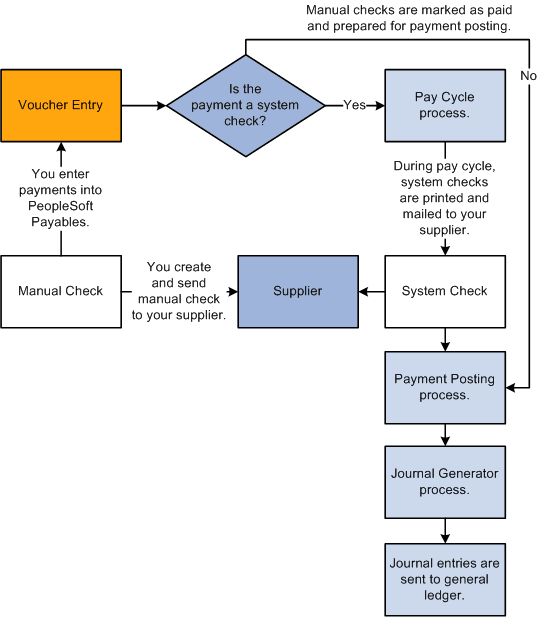
In PeopleSoft Payables, system and manual checks require a printed paper check and remittance advice. System checks are scheduled payments that you generate and print online. At voucher entry, indicate that the payment is a system check. During the next pay cycle, PeopleSoft Payables selects the payment and creates system checks. You can select to have the system generate a positive pay file and report for the system checks.
Manual checks are usually issued for payments that you have already made by physically writing a check. You create a voucher and indicate that the payment is a manual check. PeopleSoft Payables immediately marks your the payment as paid but does not print a paper check because you have previously created and issued the check.
After you create system and manual payments, you can run the payment posting process to create accounting entries and then run the Journal Generator Application Engine process (FS_JGEN) to pass the accounting entries to the general ledger. After you create system or manual checks, you can view inquiries for the payments by supplier, bank or bank account, payment method, reference number, or voucher number.
This diagram shows the process flow for system and manual checks.