Voucher - Error Summary Page
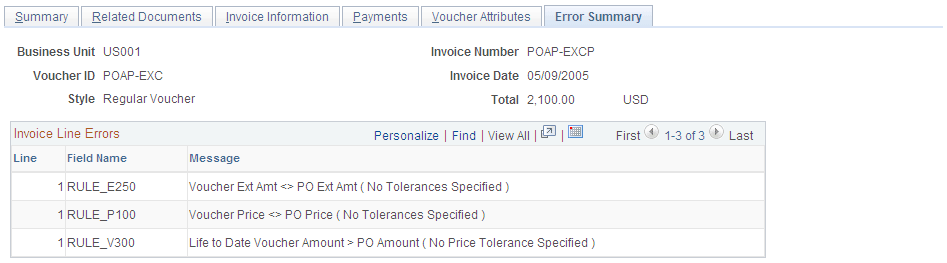
Use the Voucher - Error Summary page (VCHR_ERRORSMMRY_PG) to view any Voucher Build processing errors, matching errors, duplicate invoices, and out-of-balance and combination edit errors on the voucher.
Navigation:
This example illustrates the fields and controls on the Voucher - Error Summary page. You can find definitions for the fields and controls later on this page.
Note:
Five different scroll areas can appear on this page: Header Errors, Miscellaneous Charge Errors, Invoice Line Errors, Distribution Line Errors, and Scheduled Payment Errors. Only scroll areas that contain errors appear.
| Field or Control | Description |
|---|---|
|
Field Name |
Displays the field where the error occurred. |
|
Message |
Displays an explanation of the error. |
Viewing Voucher Errors from the Invoice Information Page and Payments Page
You can also view voucher errors directly from the Invoice Information page and the Payments page.
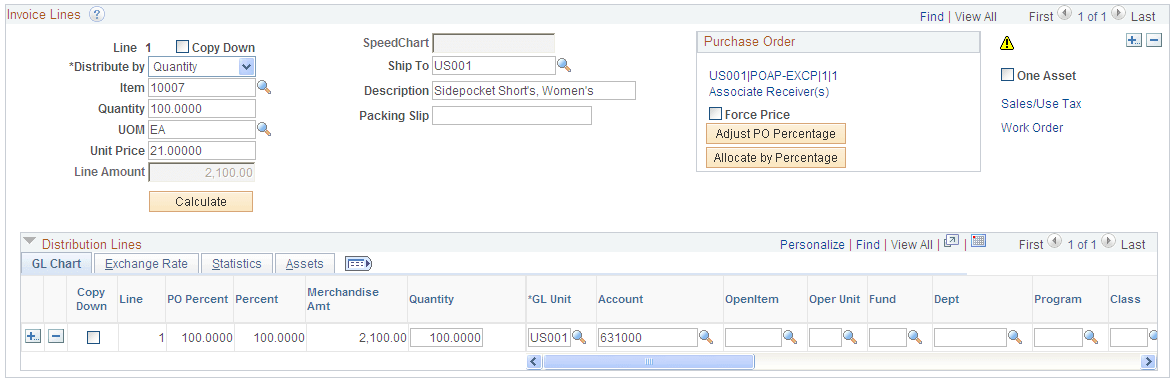
This example illustrates the fields and controls on the Invoice Lines group box on the Invoice Information page, showing the Go to Review Errors icon. You can find definitions for the fields and controls later on this page.
| Field or Control | Description |
|---|---|
|
|
Click the Go to Review Errors icon to view a description of a voucher error:
|
