Forecast Time Collection
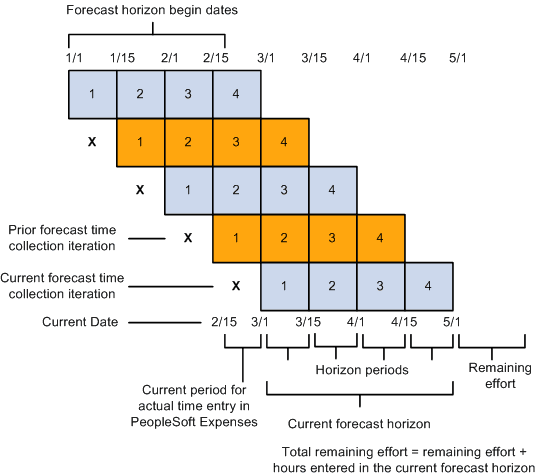
This diagram shows forecast accumulation over time for a resource. In this example, the frequency is semimonthly with four horizon periods in the forecast horizon.
When a forecast has four horizon periods in the forecast horizon, and the forecast frequency is semimonthly, then the total remaining effort is equal to the remaining effort plus the hours entered in the current forecast horizon.
Forecast Time Collection Pages
Resources use the forecast time collection pages to enter forecasted work hours. The pages initially display the current forecast, but you can also access prior forecasts. The four main time collection pages are:
-
Forecast Time - Summary page.
On this page you can:
-
Add or modify projects and activities if schedules are not up-to-date or no prepopulation mechanism is available.
-
Add new projects or activities based on the type of security that is implemented.
-
View projects for which you are a team member (if project team security is active in PeopleSoft Project Costing) and view the associated activities (if activity team security is active in PeopleSoft Project Costing).
-
Enter the total number of forecasted project hours that fall within the forecast horizon and the forecasted project hours that you expect to work during the forecast horizon on projects or activities that are in the project charging level.
-
Access the Forecast Activity Distribution page to distribute prepopulated project hours from PeopleSoft Resource Management across activities that are in the project charging level, if forecasting is required at the activity level.
-
Access the Forecast Horizon by Day page to adjust project or personal hours more precisely for specific days within the forecast horizon.
-
Access the Monthly Schedule page if PeopleSoft Resource Management is installed; on that page, resource managers can update their resources' schedules.
-
If you use PeopleSoft Expenses, access the Time Report - Time Report Summary page in PeopleSoft Expenses for resources to enter project and personal time.
-
Access the Status Report Entry component (PC_SR_ENTRY) and Issue Management Issue Detail component (PC_IM_ISSUE) in PeopleSoft Program Management to report project status and manage project issues.
-
-
Forecast Time - Forecast by Period page.
This page controls the distribution of hours across periods in the forecast horizon. On this page you can:
-
Enter the forecast for project and personal hours for each horizon period.
-
Access the Forecast Horizon by Day pages to adjust project or personal hours more precisely for specific days within the forecast horizon.
-
-
Forecast Activity Distribution page.
Activities that are in the project charging level and are associated with the project appear on this page.
Use this page when the prepopulation engine loads hours to your forecast at the project level from PeopleSoft Resource Management, but the project requires forecasting at the activity level. You can select the activities that you will work on and indicate how to distribute the project hours across activities. Alternatively, if you already know the specific activity, you can enter the information on the Forecast Time - Summary page or the Forecast Time - Forecast by Period page.
-
Forecast Horizon by Day (project-based work) page and Forecast Horizon by Day (policy time) page.
Use these pages to adjust the project or personal hours for each day within the forecast horizon and recalculate total forecast hours.
Related Topics